Zapier vs n8n for Solopreneurs: Which One Actually Fits Your Workflow?
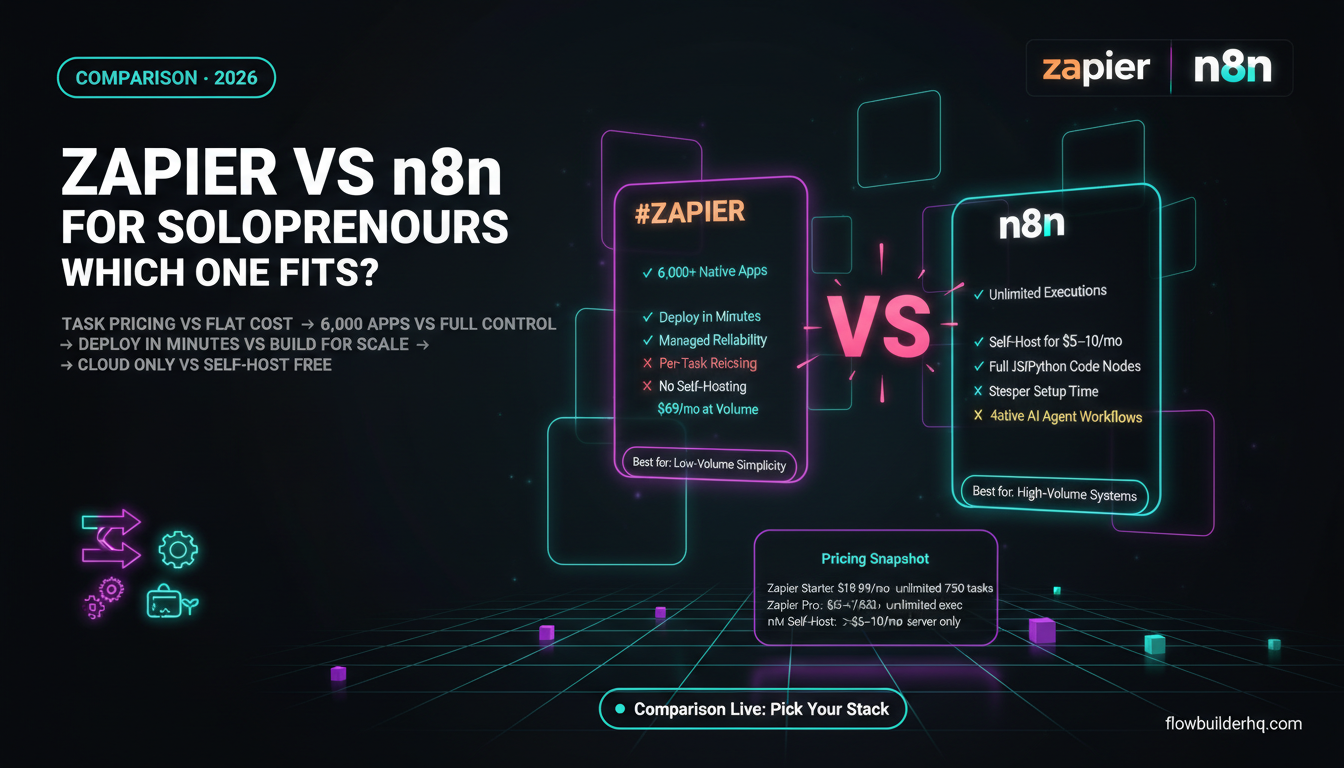
When you’re running everything yourself, your automation tool isn’t just software — it’s infrastructure. The wrong choice costs you either money every month or hours rebuilding workflows. Zapier vs n8n for solopreneurs is one of the most common decisions people in this space wrestle with, and most comparisons get it wrong by treating both tools as interchangeable.
They’re not. Zapier and n8n come from completely different philosophies. One charges you per task and gives you a polished UI. The other gives you near-unlimited power and charges you almost nothing — if you’re willing to run it yourself. Neither is objectively better. But one is almost certainly better for your specific situation.
This post breaks down exactly what separates these two tools, where each one earns its keep, and which one makes more sense depending on how you actually work.
The Core Difference Nobody Explains Clearly
Zapier is a SaaS product. You pay a monthly fee, log in through a browser, and your automations run on Zapier’s servers. Every “task” (each action a Zap performs) counts against your monthly limit. The more your automations do, the more you pay.
n8n is fundamentally different. It’s open-source automation software. You can self-host it on a $5/month VPS and run unlimited workflows with no per-execution fees. Or you can pay for n8n Cloud and skip the server management. Either way, the pricing model is completely different — you pay for compute time or a flat monthly fee, not for task volume.
That one structural difference — task-based pricing vs flat/self-hosted — is what actually drives most of the decision for solopreneurs running high-volume workflows.
Zapier vs n8n for Solopreneurs: Pricing at Scale
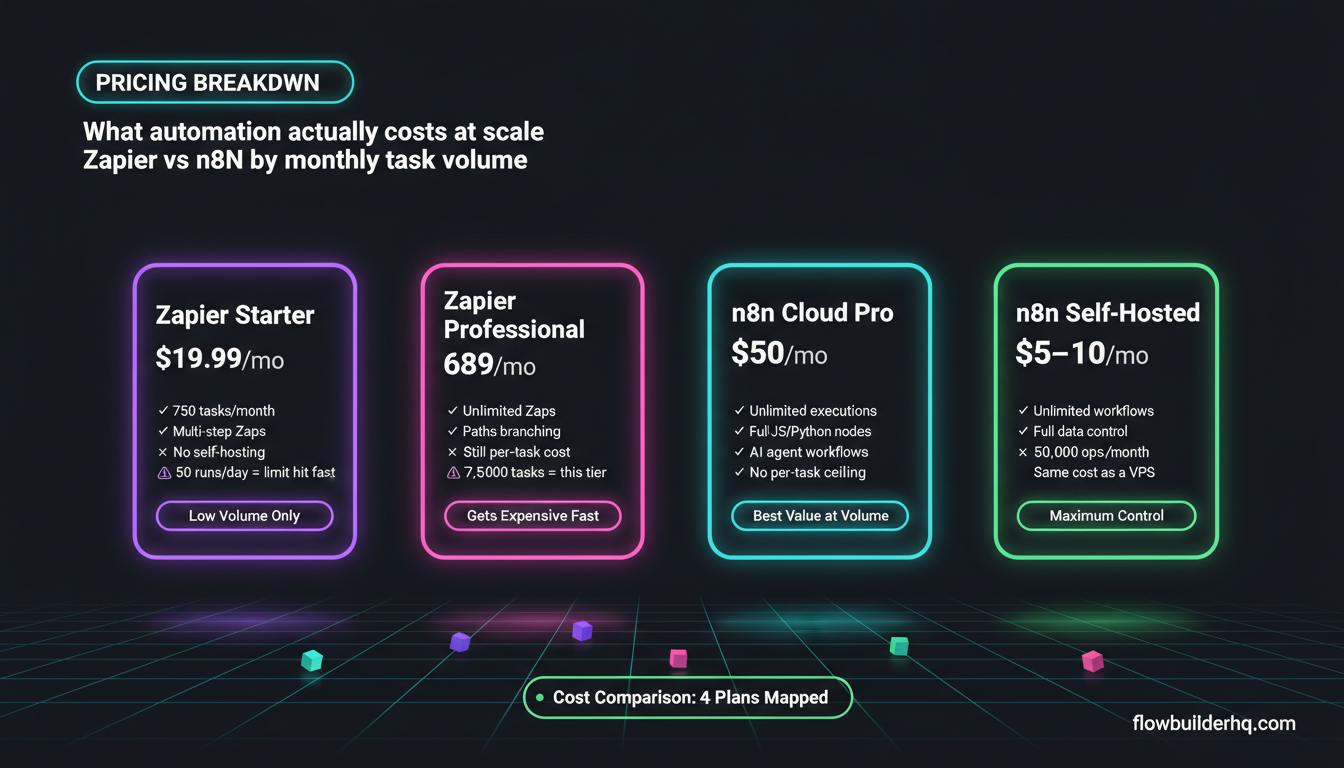
Let’s put hard numbers on this because the gap becomes significant fast.
| Plan | Zapier | n8n |
|---|---|---|
| Free tier | 100 tasks/month | Self-hosted free, Cloud Starter $8/mo |
| Entry paid | Starter $19.99/mo | Cloud Starter $8/mo |
| Mid tier | Professional $69/mo | Cloud Pro $50/mo |
| Self-hosted | Not available | Free (you pay your own server costs) |
Zapier’s Starter plan at $19.99/month gives you 750 tasks. That sounds like a lot until you have a workflow that fires 50 times a day with 5 steps each — that’s 7,500 tasks a month, well into Professional territory at $69/month.
n8n Cloud Pro at $50/month gives you unlimited executions within fair-use compute limits. Self-hosted n8n on a basic VPS costs roughly $5-10/month in server fees and runs as many workflows as your server can handle.
If you’re running any kind of volume — daily reports, lead processing, content pipelines — the math tips hard toward n8n within a few months.
Where Zapier Is Genuinely Better
Zapier isn’t overpriced for what it delivers if you need what it actually does well.
App Integrations
Zapier connects to over 6,000 apps with pre-built triggers and actions. n8n has around 400+ native integrations. That gap matters when you’re dealing with niche SaaS tools that don’t have documented APIs or when you can’t afford to spend time building a custom HTTP request setup. If your stack includes something obscure — a specific booking tool, an industry CRM, a legacy email platform — Zapier probably supports it out of the box. n8n might not.
Speed to Deploy
You can build a working Zapier automation in 10 minutes with zero technical friction. The interface walks you through every step, the field mapping is visual and forgiving, and testing is immediate. For solopreneurs who need one or two simple automations and don’t want to think about infrastructure, Zapier’s speed to working automation is hard to match.
Reliability Without Babysitting
Zapier’s uptime is enterprise-grade and managed for you. If a step fails, you get an email. You don’t need to check server logs, restart a Docker container, or wonder whether your VPS ran out of memory at 2am. For solopreneurs who genuinely don’t want to touch anything technical, that managed reliability has real value.
Multi-Step Zaps and Paths
Zapier’s Paths feature (branching logic) works cleanly and doesn’t require you to understand code or conditional logic at a technical level. For non-technical operators running conditional workflows, Zapier’s visual branching is accessible in a way n8n’s node-based editor takes longer to get comfortable with.
Where n8n Is Genuinely Better
Complex Logic Without Limits
n8n’s node-based visual editor handles multi-branch logic, loops, sub-workflows, and error handling in ways Zapier can’t match at its price points. If you’re building anything that processes lists, iterates over records, or needs conditional routing with more than a few branches, n8n handles it without bolting on paid add-ons.
Code When You Need It
n8n has a built-in Code node (JavaScript or Python) that slots into any workflow. You can transform data, build custom API calls, or write logic that no visual tool can express — without leaving the workflow. Zapier has a Code step but it’s less integrated and less flexible for complex data manipulation.
AI Agent Workflows
n8n has invested heavily in AI agent infrastructure. You can build multi-step AI pipelines — with memory, tool use, and custom prompts — directly in n8n’s workflow editor. If your solopreneur operation involves anything touching AI (content pipelines, lead enrichment, customer response drafts), n8n’s native AI node ecosystem is ahead of Zapier’s current offering. See how this works in practice with connecting Claude AI to n8n for a practical example.
Self-Hosting = Full Control
When you self-host n8n, your data doesn’t leave your infrastructure. For solopreneurs handling client data, financial information, or anything subject to privacy constraints, that matters. Zapier processes everything through their cloud. For most use cases that’s fine, but when it’s not fine, n8n gives you the exit.
Check the full breakdown of your hosting options in n8n self-hosted vs cloud — there’s more nuance in that decision than most people expect.
Pricing for Volume
As covered above: if your workflows process more than a few hundred tasks per day, n8n’s economics become hard to argue with. Self-hosted n8n processing 50,000 operations/month costs roughly the same as a cheap VPS. Zapier processing the same volume would cost hundreds per month.
The Technical Barrier Is Real — But Overstated
The most common argument for Zapier over n8n is that n8n is too technical for non-developers. That was more true two years ago than it is now.
n8n Cloud removes the server setup entirely. You get a hosted n8n instance, no Docker, no CLI, no config files. The workflow builder is visual and the interface has improved significantly. Someone who can use Make.com can get productive in n8n Cloud within a few days.
Self-hosted n8n is a different story. Setting up a VPS, installing n8n via Docker, managing updates, and debugging when things break does require comfort with basic Linux and command-line operations. That’s not nothing. But it’s also not “developer required” — plenty of non-technical solopreneurs run self-hosted n8n after spending one weekend with a setup tutorial.
The honest assessment: if the idea of SSHing into a server once a month makes you want to close the tab, use n8n Cloud or skip n8n entirely. If you’re comfortable enough to Google your way through basic server errors, self-hosted n8n is within reach.
Zapier vs n8n: Side-by-Side Feature Comparison
| Feature | Zapier | n8n |
|---|---|---|
| Native integrations | 6,000+ | 400+ |
| Custom HTTP requests | Yes (Webhooks app) | Yes (native HTTP node) |
| Code execution | Limited | Full JS/Python nodes |
| AI agent workflows | Basic | Advanced native support |
| Self-hosting | No | Yes (free) |
| Pricing model | Per task | Flat / compute-based |
| Setup time | Minutes | Hours (Cloud) / Day+ (self-hosted) |
| Error handling | Basic retry | Advanced error workflows |
| Sub-workflows | Limited | Full support |
| Data privacy | Cloud only | Self-host for full control |
Who Should Use Zapier
- You run fewer than 10-15 simple automations and volume is low (under 5,000 tasks/month)
- Your stack includes niche apps with no documented API that only Zapier supports
- You want zero infrastructure responsibility and are willing to pay for that
- You need a new automation running today, not this week
- You’re onboarding a team member who has zero automation background and needs to edit Zaps without support
Who Should Use n8n
- You’re building complex multi-step workflows with loops, branches, or data transformation
- You’re running high task volumes where Zapier’s per-task cost becomes painful
- You’re building AI-powered pipelines (content, leads, client communication)
- You want self-hosted options for data control or privacy requirements
- You’re comfortable with a slightly steeper learning curve in exchange for long-term cost savings and flexibility
- You’re already using or considering Make.com and want to compare your options — see the full n8n vs Make.com breakdown for that comparison
The Migration Question
A lot of solopreneurs start on Zapier and outgrow it. The migration path to n8n isn’t painful if you plan it — but you do need to rebuild workflows from scratch. There’s no Zapier-to-n8n import tool. If you have 40 Zaps, that’s a real time investment.
The smarter play: if you suspect you’ll outgrow Zapier within 12 months based on workflow complexity or cost projections, start on n8n now. The learning curve is front-loaded. Rebuilding 40 workflows later is worse than learning the tool once at the beginning.
If you’re processing client work at any volume, the n8n client onboarding automation guide shows exactly how a real workflow gets structured for that use case.
The Verdict
For most solopreneurs running anything beyond basic single-step automations, n8n wins on economics and flexibility. The per-task pricing model at Zapier is the fundamental problem — it creates a ceiling on what you can automate without budget anxiety.
Zapier earns its place for solopreneurs who value maximum app coverage, minimal setup friction, and managed reliability over cost efficiency. If you’re automating three simple things and never plan to expand, Zapier at Starter pricing is perfectly reasonable.
But if you’re building out real systems — lead pipelines, content automation, AI-assisted workflows, client operations — n8n is the better long-term bet. Start with n8n Cloud if self-hosting isn’t something you want to deal with. The $8/month Cloud Starter plan gets you hands-on experience without server management, and upgrading to Pro at $50/month still undercuts Zapier Professional at most realistic usage volumes.
The question isn’t which tool is more powerful. It’s which tool fits how you actually work and what you’re willing to pay as your automation volume grows.
Building this yourself? Get the workflow pack.
5 ready-to-import n8n workflows — lead capture, invoicing, content repurposing, onboarding, social posting. Free.