Make.com for Ecommerce Solopreneurs: The Complete Automation Playbook
Make.com for ecommerce solopreneurs is one of the more practical pairings in the automation space right now. You’re running a store solo or near-solo, orders are coming in, customer emails are stacking up, inventory needs updating, and you’re doing most of it by hand. Make.com is built exactly for this situation — visual workflow logic, multi-step branching, and enough integrations to connect every tool in a lean ecommerce stack.
This isn’t a pitch. It’s a breakdown of where Make.com actually earns its place in an ecommerce operation, where it falls short, and how to think about building with it when you’re the only person watching the automations run.
What Make.com Is Actually Good at for Ecommerce
Make.com’s core strength is its scenario builder — a visual canvas where you drag modules in, connect them, and define exactly what data moves where. For ecommerce, that means you can build workflows that span Shopify (or WooCommerce), your email tool, a fulfillment API, your CRM, and a Slack channel, all in one visual chain.
The things it handles well:
- Order routing and fulfillment triggers — When a new order hits Shopify with a specific tag or product type, Make.com can fire off a sequence: update a Google Sheet, ping a fulfillment partner via HTTP, send a custom confirmation email, and log the order in Airtable. All in one scenario.
- Abandoned cart follow-up — Trigger off Shopify’s abandoned checkout webhook, filter by cart value, and push contacts into an ActiveCampaign sequence based on the total. You control the logic, not a pre-baked “automation” inside the email tool.
- Inventory alerts — Watch a product’s inventory level via scheduled polling, and when stock drops below a threshold, email yourself, update a tracking sheet, or draft a purchase order and drop it into a Google Doc.
- Customer support triage — Pull incoming support emails, classify them with an AI module (Claude or GPT-4o), and route based on category: refund requests go to one folder, shipping questions to another, general queries to a template reply.
- Post-purchase review requests — X days after fulfillment, trigger a review request via MailerLite or your preferred tool. The timing is controlled in Make.com using a delay module, not locked behind a paid feature in your email platform.
Make.com Pricing: What You Actually Pay as an Ecommerce Solopreneur
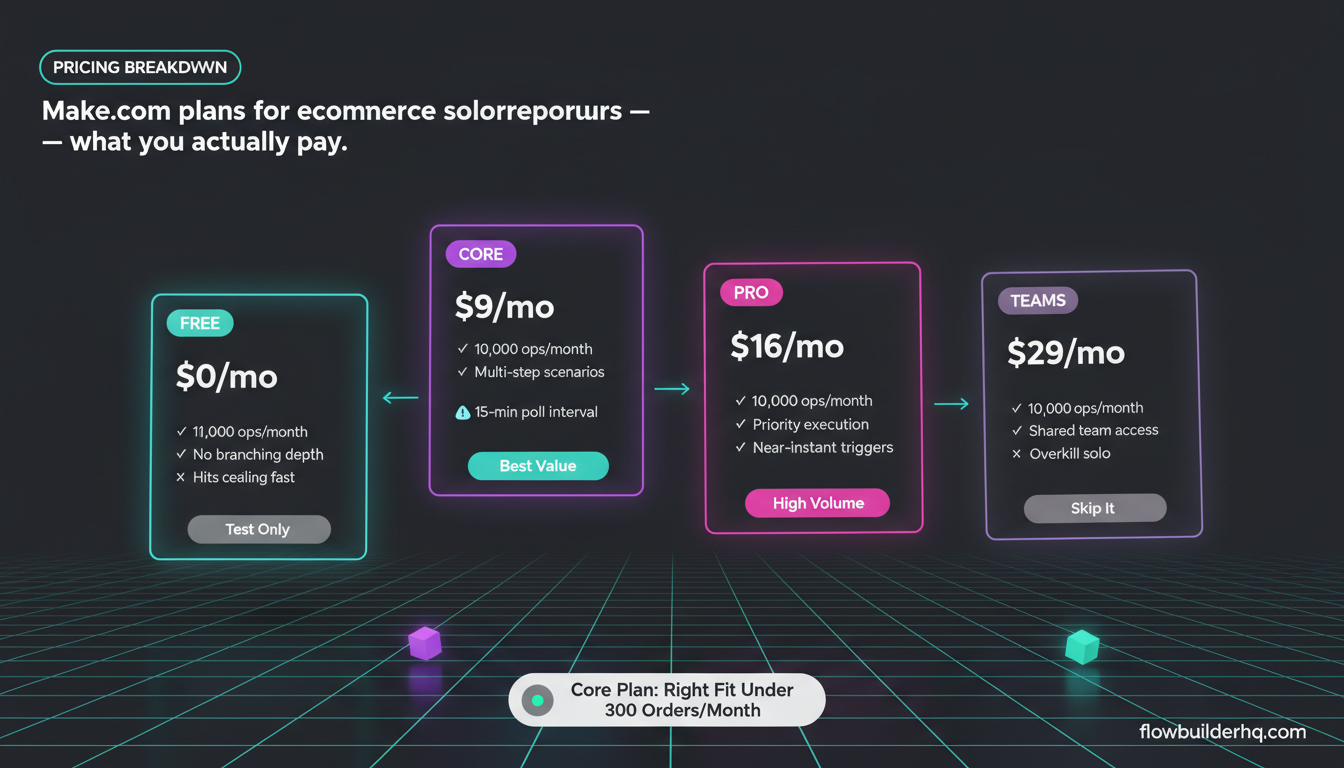
Make.com’s free plan gives you 1,000 operations per month. For a brand doing under 100 orders a month with a few automations, that’s borderline workable, but you’ll hit the ceiling fast once you add branching scenarios.
Here’s the current pricing breakdown:
| Plan | Monthly Price | Operations/Month |
|---|---|---|
| Free | $0 | 1,000 |
| Core | $9/mo | 10,000 |
| Pro | $16/mo | 10,000 + priority execution |
| Teams | $29/mo | 10,000 + shared team access |
For most solo ecommerce operators, the Core plan at $9/mo is the right starting point. You get 10,000 operations, which handles a decent order volume across several active scenarios. If you’re processing 300+ orders a month and running 8-10 scenarios, watch your op count — each module step in a scenario counts as one operation.
Worth comparing: the full Make.com review for 2026 breaks down exactly how operations get counted and where you can optimize to stay under the limit.
Building a Real Ecommerce Workflow in Make.com
Here’s a concrete example: an automated post-purchase flow that handles confirmation, fulfillment notification, and a review request sequence — without touching anything manually.
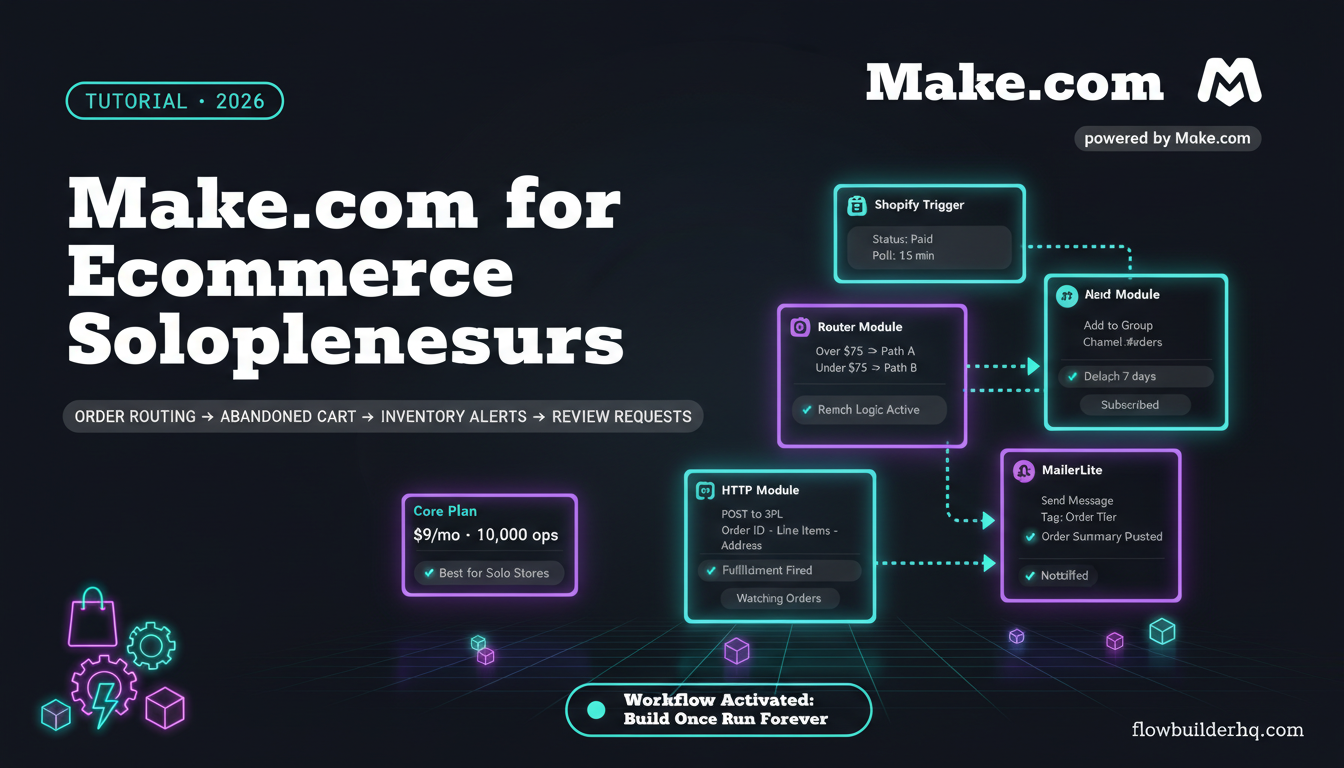
Scenario: Post-Purchase Automation Chain
- Trigger: Shopify — Watch Orders (paid status) — Set the trigger to fire on new paid orders. Make.com polls Shopify at your chosen interval (every 15 minutes on Core, near-instant on Pro).
- Router module — Branch based on order value. Orders over $75 go to path A (premium handling), under $75 go to path B (standard).
- Path A — HTTP module to fulfillment partner API — POST the order details to your 3PL’s webhook endpoint. Map order ID, line items, and shipping address from the Shopify trigger data.
- Path B — Google Sheets: Add a Row — Log the order for manual batch fulfillment if you’re shipping in-house.
- Both paths — MailerLite: Add Subscriber to Group — Add the customer to a post-purchase group tagged with their order value tier. This feeds into a MailerLite automation that sends the review request after 7 days.
- Slack: Send a Message — Post a summary to a private Slack channel so you have a running feed of orders without opening Shopify every hour.
This whole scenario takes about 45 minutes to build the first time. The trickiest part is usually the Shopify connection — you’ll need to create a custom app in your Shopify admin to get the API credentials. Make.com’s Shopify module documentation walks through this, but expect to spend 15 minutes in the Shopify partner dashboard if you haven’t done it before.
Common Error: Operations Not Firing on Schedule
A frequent issue for new Make.com users: you set up the Shopify trigger, run the scenario manually and it works fine, but scheduled runs aren’t pulling new orders. Nine times out of ten, the trigger is set to “watch” but the scenario isn’t activated — the toggle at the top of the scenario editor needs to be switched to ON. It sounds obvious, but the visual difference between active and inactive scenarios is subtle in Make.com’s UI.
Second common issue: the scenario runs but returns zero bundles. Check that your Shopify trigger has a “from date” set, or that you’ve processed at least one order since connecting the module. Make.com needs a baseline record to know where to start watching from.
Where Make.com Falls Short for Ecommerce
Being direct about the friction points:
- No native Shopify real-time webhooks on lower plans — On the Core plan, Shopify scenarios poll at intervals rather than firing instantly. If you need true real-time order processing (under 2 minutes), you’re looking at the Pro plan or setting up a custom webhook via Make.com’s webhook trigger module and a Shopify webhook, which adds complexity.
- Operation counting adds up fast — A scenario with 8 modules fires 8 operations per order. At 500 orders/month, that’s 4,000 ops from one scenario. Add 3-4 more scenarios and you’re watching your op count like a gas gauge.
- Error handling is manual — When a module fails mid-scenario (the fulfillment API is down, for example), Make.com logs the error but doesn’t auto-retry unless you explicitly build error handler routes. For a solopreneur who won’t be watching dashboards all day, missed operations are easy to overlook if you haven’t set up email error alerts.
- No built-in ecommerce analytics — Make.com moves data; it doesn’t analyze it. You still need a reporting layer elsewhere. This surprises people who expect the automation tool to give them dashboards.
- Learning curve on complex logic — Filters, iterators, and aggregators in Make.com take real time to understand. Building a scenario that processes all line items in a multi-product order (not just the first item) requires the iterator module, which isn’t obvious when you’re starting out.
Make.com vs. Zapier for Ecommerce: The Quick Version
Zapier is the most common comparison. The core difference for ecommerce solopreneurs comes down to pricing at volume and workflow complexity.
| Factor | Make.com | Zapier |
|---|---|---|
| Entry paid plan | $9/mo (10K ops) | $19.99/mo (750 tasks) |
| Multi-step branching | Yes, visual | Limited on lower plans |
| Error visibility | Good | Good |
| Learning curve | Steeper | Gentler |
| Best for | Complex multi-step flows | Simple 2-3 step automations |
For ecommerce solopreneurs with multi-step flows (order → fulfillment → CRM → email), Make.com wins on price-to-complexity ratio. Zapier’s Starter plan at $19.99/mo gives you 750 tasks — less headroom than Make.com’s Core plan at less than half the price.
See the n8n vs Make.com breakdown if you’re weighing the self-hosted option. n8n Cloud starts at $8/mo and has no operation limits, which is worth knowing if your order volume is high.
The Ecommerce Automations Worth Building First
If you’re new to Make.com and have a live store, prioritize in this order based on time-to-value:
- Order logging to Google Sheets or Airtable — Takes 20 minutes to build, runs forever, saves the manual export every week. Start here to get familiar with the Shopify module and data mapping.
- Low stock alerts — A scheduled scenario that checks inventory every 24 hours and emails you when any SKU drops below a threshold. Simple filter logic, huge operational value.
- Abandoned cart to email sequence — The highest ROI automation for most stores. Filter by cart value to avoid wasting sequences on $8 carts.
- Customer support email routing — Connect Gmail or a help desk tool, use Make.com’s built-in text parser or an AI module to classify emails, and route to labeled folders or a Notion database. Check out this breakdown on automated onboarding flows for comparable routing logic you can adapt.
- Post-purchase review request timing — As covered above. Control the delay in Make.com rather than paying for the feature in your email tool.
Who Make.com for Ecommerce Works Best For
Make.com fits best when:
- You’re running a Shopify or WooCommerce store and already have 3-4 tools in your stack that don’t talk to each other
- You’re comfortable reading API documentation when you need to use the HTTP module
- You need branching logic — different paths based on order value, product type, customer tag, etc.
- You’re processing under 1,000 orders/month (above that, op counting becomes a real management task)
Make.com is a harder sell if:
- You want something pre-built with zero configuration — Make.com is a tool, not a service
- You need real-time order processing and won’t pay for Pro
- You have very high order volume and need unlimited operations at low cost (n8n self-hosted is free at any volume)
For a broader look at how Make.com stacks up across different use cases, the best automation tools for solopreneurs in 2026 gives the full picture across pricing tiers and tool categories.
Getting Started
Make.com’s free plan is the right place to start. Build your first scenario against a real Shopify connection, watch the data flow, and you’ll know within a few hours whether the tool clicks for how you think. The visual canvas is either intuitive or frustrating depending on your mental model — find out before committing to a paid plan.
Start a free account at Make.com and build your first ecommerce scenario on the free tier before deciding on a paid plan.
Building this yourself? Get the workflow pack.
5 ready-to-import n8n workflows — lead capture, invoicing, content repurposing, onboarding, social posting. Free.