No-Code Workflow Automation for Service-Based Solopreneurs: 7 Tools That Cover the Full Service Delivery Lifecycle
No-code workflow automation for service-based solopreneurs is a different animal than what most automation content covers. The typical advice assumes you’re selling products, running ads, or publishing content. But if you’re a coach, consultant, or freelancer, your business runs on proposals, onboarding sequences, deliverable handoffs, and invoices — not inventory counts or email broadcast metrics.
The tools that work best for product businesses often create unnecessary complexity for service providers. And the tools built for enterprise teams assume you have a RevOps person to maintain them. Neither fits a one-person service business.
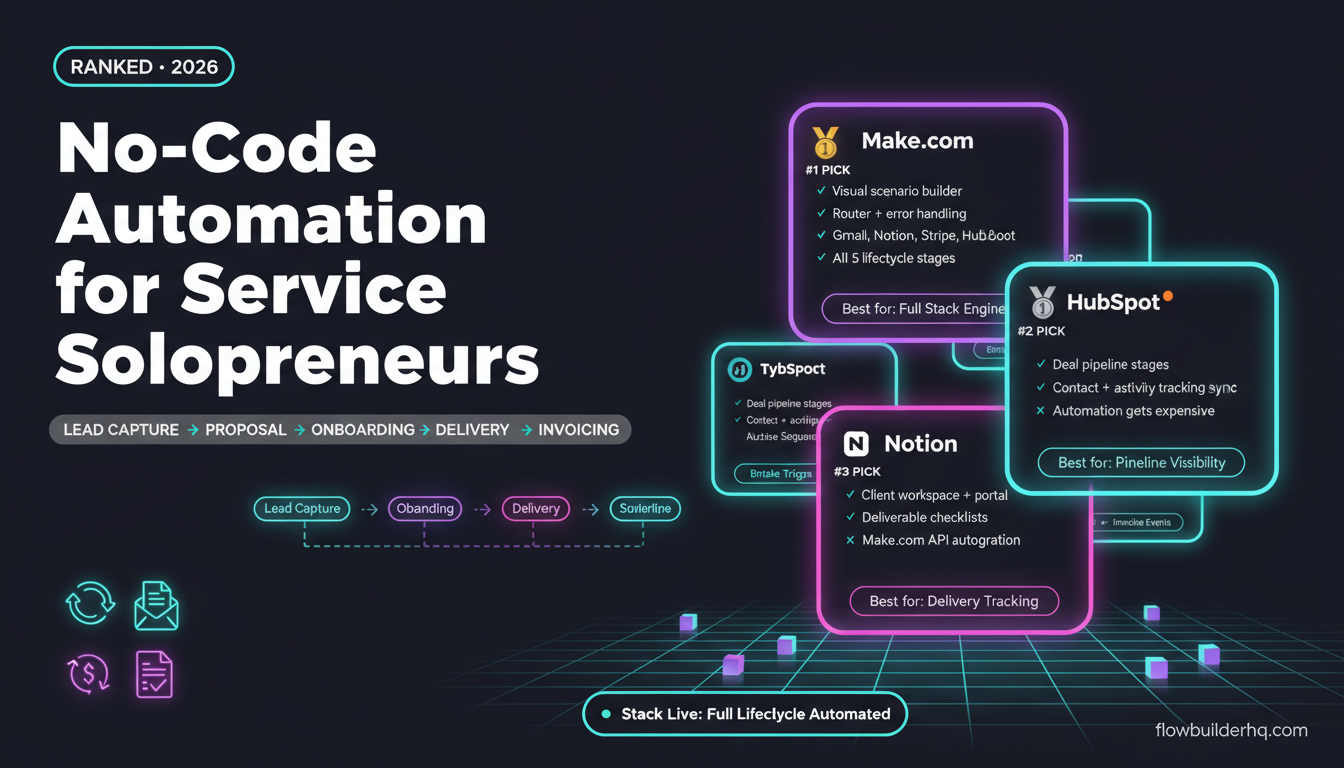
This list is built around the service delivery lifecycle: the five stages every service business runs through with every client — lead capture → proposal → onboarding → delivery → invoicing and offboarding. Each tool below earns its spot by covering at least one stage of that lifecycle well, without requiring a developer or a dedicated ops role to maintain it.
What Makes Automation Different for Service Providers
Product businesses automate volume. Service businesses automate process. That distinction matters because the failure modes are different. If your Shopify order confirmation email breaks, a customer gets annoyed. If your client onboarding sequence breaks, a new client feels ignored on day one of a $5,000 engagement.
The stakes per workflow are higher, the sequences are longer, and the tools need to handle more bespoke logic — conditional paths based on service tier, document generation, client-specific Slack channels, or proposal approval triggers. Most “beginner automation” content skips all of this.
If you want a broader look at what to automate first as a solo operator before picking tools, this prioritization framework is worth reading before you build anything.
The 7 Best No-Code Automation Tools for Service-Based Solopreneurs
1. Make.com — Best Core Automation Engine for the Full Lifecycle
What it covers: All five lifecycle stages, depending on what you connect to it.
Make.com is the engine most service-based solopreneurs should build around. The visual scenario builder lets you create multi-step workflows that branch on conditions — exactly what you need when your onboarding sequence differs for a $1,500 project versus a $10,000 retainer.
The practical advantages over simpler tools: Make handles iterators (processing multiple line items in a proposal), routers (if/then branching based on service type), and error handling without requiring you to learn code. For a service business, that matters. A proposal workflow that silently fails because a PDF generation step errored is worse than no automation at all. Make’s built-in error handling catches those failures and can route them to a Slack message or email so you actually know something broke.
Make’s native integrations cover most of what service providers need: Gmail, Google Docs, Notion, HubSpot, Stripe, PayPal, Calendly, Typeform, and dozens more. When a native integration doesn’t exist, HTTP modules fill the gap.
Real use case: A consultant uses a Typeform intake form as the trigger. Make reads the responses, creates a Notion client page, drafts a proposal document in Google Docs using a template, sends it for e-signature, and updates a HubSpot deal — all without touching anything manually. If you want to see this kind of workflow mapped out in detail, the proposal automation walkthrough on this site covers it step by step.
Honest con: Make’s scenario editor has a learning curve. The first time you build a router with multiple filter conditions, expect to spend an hour getting the logic right. It’s not as instant as Zapier, but it’s also not as limited.
Pricing: Free (1,000 ops/month). Core $9/mo. Pro $16/mo. Teams $29/mo.
Who it’s NOT for: If you have exactly one simple two-step workflow and never plan to expand, Zapier’s UI is faster to set up. For everyone else building a real service delivery stack, Make is the better long-term choice.
Start with Make.com’s free plan — 1,000 ops/month is enough to test your core service workflows before committing to a paid tier.
2. Albato — Best for Connecting Niche Tools Without HTTP Modules
What it covers: Lead capture, onboarding triggers, notification routing.
Albato doesn’t replace Make.com — it fills gaps in your stack when a tool you already use isn’t covered by Make’s native integrations. For service providers, that often means connecting niche CRMs, regional payment processors, or specialized booking tools.
The platform is particularly strong for solopreneurs who want reliable, simple trigger-action automations without building out full multi-step scenarios. If you need “when this form is submitted, create a contact in my CRM and send a Slack message,” Albato handles that cleanly with a setup time under 10 minutes.
One real differentiator: Albato’s integration library includes tools that larger platforms often ignore — regional alternatives to Stripe, Eastern European CRMs, and less common project management tools. If your client base or vendor stack includes tools that aren’t Zapier-famous, Albato is worth checking before you spend hours building an HTTP module workaround in Make.
Honest con: Complex conditional logic — the kind you need for tiered service onboarding — isn’t Albato’s strength. Use it for clean, linear automations. For anything with branching paths, Make.com is the better fit.
Pricing: Free trial. Pro $25/mo. Business $59/mo.
Who it’s NOT for: Solopreneurs who want a single tool for their entire stack. Albato works best as a complement to Make, not a replacement.
Try Albato’s free trial and check whether your niche tools are already covered before building workarounds.
3. HubSpot Free CRM — Best for Lead and Pipeline Tracking
What it covers: Lead capture, proposal pipeline management, client relationship tracking.
Service businesses live and die by their pipeline visibility. HubSpot’s free CRM gives you deal stages, contact records, activity tracking, and email logging — all without paying anything. For a solo service provider, that’s significant.
The automation angle: HubSpot’s free tier includes basic sequences and deal-stage-based email triggers. More sophisticated automations (automatic deal creation from form fills, proposal sent → deal stage update) connect cleanly to Make.com via HubSpot’s native API, which has one of the better-documented integration surfaces of any CRM at this price point.
For service providers specifically, the deal pipeline view is more valuable than a generic project management board because it maps directly to the revenue stages of your business: prospect, proposal sent, contract signed, in delivery, invoiced, closed. That visibility alone helps you catch bottlenecks — proposals sitting unsigned for two weeks, invoices not paid after 30 days — that a task manager won’t surface.
Honest con: HubSpot’s automation gets expensive fast. The free tier is genuinely useful, but the jump to Professional ($890/mo+) is brutal for a solopreneur. If you need advanced workflow automation inside HubSpot, you’re better off handling that logic in Make.com and using HubSpot purely as a CRM. If you haven’t set up HubSpot’s pipeline yet, this step-by-step pipeline setup guide covers the free plan configuration.
Pricing: Free CRM. Starter $15/mo. Professional $890/mo+.
Who it’s NOT for: If you prefer a document-based workspace for client management, Notion CRM may suit your style better than HubSpot’s more structured interface.
4. Notion — Best for Client Workspace and Delivery Tracking
What it covers: Onboarding, delivery tracking, client portals, SOPs.
Notion is where the actual work happens. For service providers, it functions as the delivery layer of your stack — client-specific databases, project trackers, deliverable checklists, and shared client portals all live here.
The automation angle: Notion’s native automations are limited (basic property updates and database triggers), but its API is solid and Make.com integrates with it cleanly. A complete onboarding workflow might look like: contract signed in DocuSign → Make.com triggers → new Notion page created from template → client portal URL generated → welcome email sent. The Notion piece is the workspace; Make handles the orchestration.
For solopreneurs who think in documents and databases rather than CRM fields, Notion is more natural to maintain than HubSpot. The tradeoff is that Notion requires more setup to get the structure right for your service business, and it won’t replace pipeline visibility the way HubSpot does.
If you’re building Notion into your automation stack, the Make.com + Notion integration guide covers the practical connection setup and real workflow examples.
Honest con: Notion databases are powerful but fragile when multiple people (you + clients) are editing them. Client-facing portals work better in view-only or comment-only mode. Also, Notion’s API rate limits can cause issues with high-volume Make.com scenarios.
Pricing: Free. Plus $10/mo. Business $18/mo.
Who it’s NOT for: Service providers who need strong CRM features — contact activity logs, email tracking, deal history — won’t find those in Notion without significant custom database work.
5. Typeform — Best for Intake Forms and Proposal Triggers
What it covers: Lead capture, project intake, client discovery, onboarding questionnaires.
Every service business has intake moments — the new lead questionnaire, the discovery call prep form, the project brief, the onboarding survey. How you capture that information determines how clean your downstream automation is.
Typeform earns its spot here because the response data it generates is structured, clean, and webhook-ready. When a new client submits a project brief, Typeform fires a webhook that Make.com catches instantly. From there, Make can parse every field — service type, budget range, timeline, company name — and use those values to branch your workflow, populate a proposal template, create a Notion page, or update a HubSpot deal.
The alternative (email-based intake) produces unstructured text that’s far harder to automate around. Typeform solves that. For a real example of how this trigger connects to a full intake workflow, the Typeform + Make.com intake automation post walks through the exact setup.
Honest con: Typeform’s free plan limits you to 10 responses per month — which is fine for testing but not for active client intake. Pricing for the paid tiers (check current pricing on their site) adds up if you’re running multiple forms. Google Forms is free and also webhooks cleanly through Make, but the UX for clients is noticeably worse.
Who it’s NOT for: Service providers who don’t need conditional logic in their forms and are watching costs closely. A well-structured Google Form connected to Make via a Google Sheets trigger achieves similar automation results at zero cost.
6. Stripe — Best for Invoicing and Payment Triggers
What it covers: Invoicing, payment confirmation, subscription management, offboarding triggers.
Payment events are some of the most valuable automation triggers a service business has. When a client pays an invoice, you want several things to happen automatically: a receipt sent, a project kickoff triggered, a Notion database updated, maybe a “payment received” Slack notification for your own awareness.
Stripe’s webhook events are clean and well-documented, and Make.com has a native Stripe integration that covers the key triggers: invoice paid, payment failed, subscription created, subscription cancelled. For service providers on retainers, the subscription events are particularly useful — a cancelled subscription can trigger an offboarding checklist in Notion and an automated check-in email from your Gmail account.
Invoicing automation is often the last thing solopreneurs set up, but it’s one of the highest-value. Manual invoicing is error-prone, and late follow-up on unpaid invoices is money left on the table. If you want the full build, the Make.com invoicing automation guide covers Stripe and PayPal integration end to end.
Honest con: Stripe’s standard processing fees (check current rates on their site) are a real cost at volume. For small-ticket services, the fees matter more. PayPal is an alternative with Make.com integration, though Stripe’s webhook documentation is more developer-friendly and easier to work with inside Make.
Who it’s NOT for: Solopreneurs who invoice through FreshBooks, Wave, or QuickBooks and don’t want to switch payment processors. Most invoicing tools have their own Make.com integrations — check whether your existing tool already supports the triggers you need before migrating to Stripe.
7. MailerLite — Best for Nurture Sequences and Offboarding
What it covers: Lead nurture, proposal follow-up sequences, post-project offboarding emails.
Service businesses need email automation at two points in the lifecycle: before someone becomes a client (nurture and follow-up) and after a project ends (referral asks, re-engagement, testimonial requests). MailerLite handles both cleanly without the pricing complexity of ActiveCampaign or the enterprise bloat of HubSpot’s email tools.
The Make.com integration lets you add contacts to MailerLite sequences based on lifecycle events. Proposal sent → contact added to a “proposal follow-up” sequence that sends three emails over seven days. Project completed → contact moved to an “offboarding” sequence that requests a testimonial, delivers a final summary, and asks for referrals. These automations run without you thinking about them.
MailerLite’s automation builder is also usable on its own for simpler trigger-based sequences — you don’t need Make.com involved for basic drip campaigns. That makes it genuinely useful even if you’re just starting to build your stack. For a head-to-head look at how MailerLite compares to the alternatives, this MailerLite vs ActiveCampaign vs HubSpot breakdown covers the honest tradeoffs for solo service providers.
Honest con: MailerLite’s automation logic is simpler than ActiveCampaign’s. If you need complex behavioral branching — “if contact clicked link A but not link B, and last opened email was more than 14 days ago” — ActiveCampaign is more capable. MailerLite is best for clean linear sequences.
Pricing: Free up to 500 subscribers. Growing $10-15/mo. Advanced $18-25/mo.
Who it’s NOT for: Service providers who already have an email tool they’re happy with. MailerLite doesn’t offer enough of an upgrade over a working ConvertKit or ActiveCampaign setup to justify migration just for automation features.
How These Tools Map to the Service Delivery Lifecycle
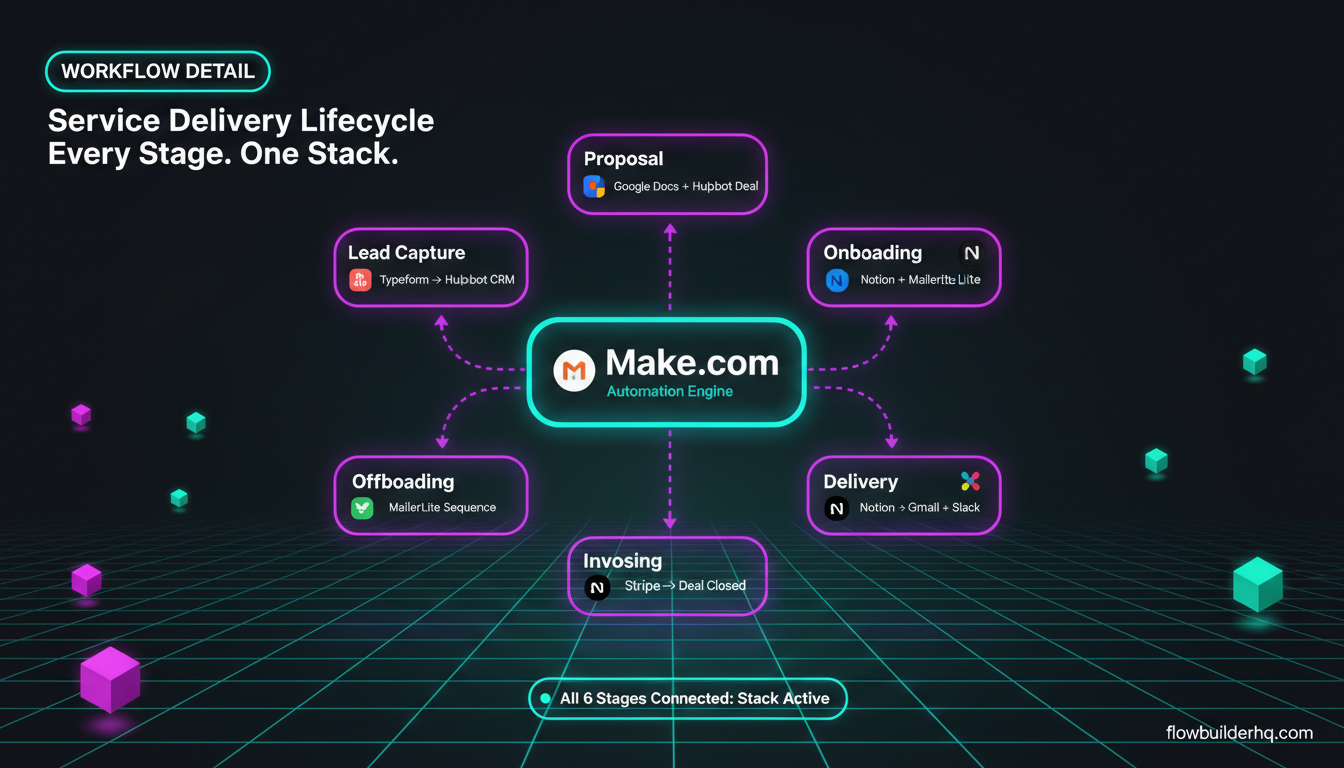
| Lifecycle Stage | Primary Tool | Supporting Tool | Automation Engine |
|---|---|---|---|
| Lead Capture | Typeform | HubSpot CRM | Make.com |
| Proposal | Google Docs / PandaDoc | HubSpot (deal stage) | Make.com |
| Onboarding | Notion | MailerLite | Make.com / Albato |
| Delivery | Notion | Slack / Gmail | Make.com |
| Invoicing | Stripe | HubSpot (deal closed) | Make.com |
| Offboarding / Nurture | MailerLite | HubSpot | Make.com / Albato |
Make.com appears in every row because it’s the connective tissue. The other tools each own a specific stage. Albato fills in where Make’s native integrations fall short, particularly for niche tools in the onboarding and offboarding stages.
Building Your Stack: Where to Start
Don’t try to automate every lifecycle stage at once. The highest-leverage starting point for most service providers is onboarding — it’s where manual work is most concentrated, mistakes are most costly, and client experience is most visible.
Build the intake-to-onboarding flow first: Typeform → Make.com → Notion client page + MailerLite welcome sequence. Once that runs reliably, add the proposal layer. Then invoicing. The stack compounds — each stage you automate makes the next one easier to connect.
For a deeper look at which tasks to tackle first across your entire business, this guide on automating repetitive tasks as a solopreneur covers a prioritization approach with real workflow examples.
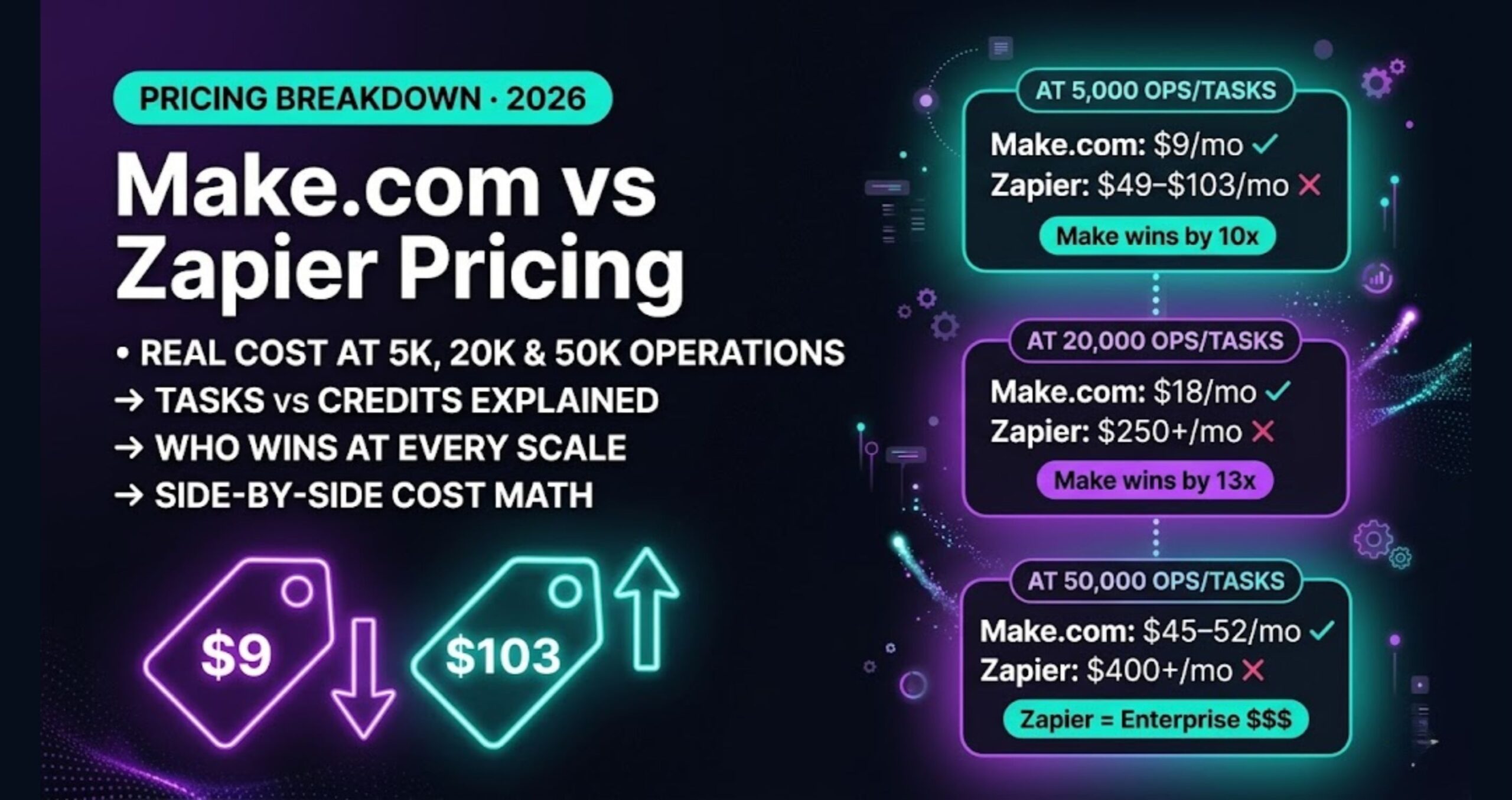
If you’re evaluating whether Make.com fits your budget as your primary automation engine, the Make.com pricing breakdown for 2026 covers how operations are counted and what you’ll actually pay as your workflow volume grows.
The service delivery lifecycle isn’t glamorous to automate. There’s no viral “I automated my entire business in a weekend” moment. But a proposal that goes out 20 minutes after a form submission, an onboarding sequence that runs without you, and an invoice that triggers a kickoff automatically — those stack into real hours saved and a noticeably more professional client experience.
Start with Make.com’s free plan and build one stage of your lifecycle at a time. That’s the approach that actually gets finished.
Building this yourself? Get the workflow pack.
5 ready-to-import n8n workflows — lead capture, invoicing, content repurposing, onboarding, social posting. Free.