Frase vs Surfer SEO for Solopreneurs: Which One Actually Fits a One-Person Workflow?
The Verdict Up Front
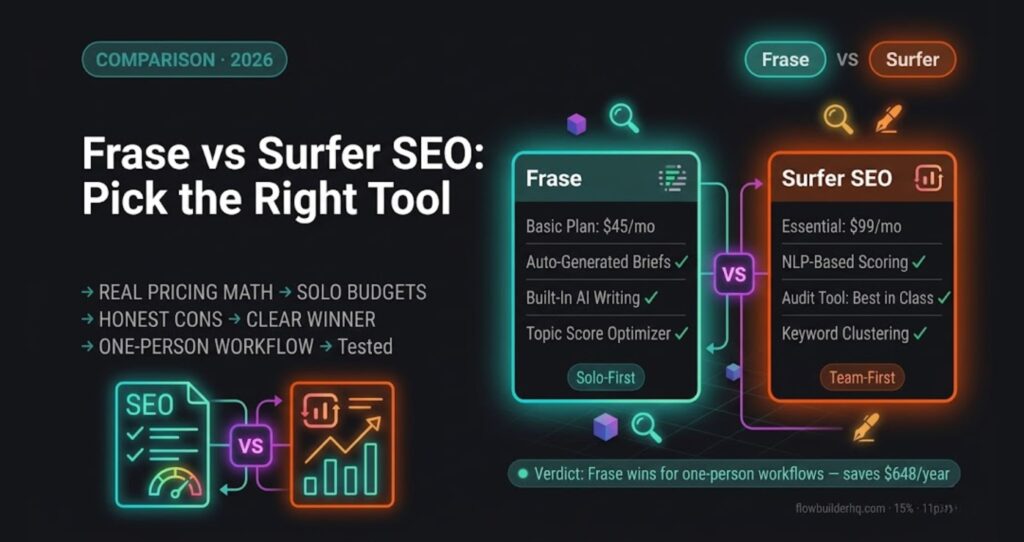
Frase vs Surfer SEO is the question every solopreneur doing content marketing hits eventually. If you’re running SEO alone, Frase wins.. Not because Surfer is bad — it’s genuinely impressive software — but because Frase is built around the workflow one person actually runs: research, outline, write, optimize, done. Surfer is built for teams with content editors, writers, and SEO strategists working in parallel. That’s not you right now.
I run SEO for FlowBuilderHQ — this site — and evaluated both Frase and Surfer extensively when choosing my content stack. The difference in daily friction for a solo operator is significant. Here’s the full breakdown.
Who This Comparison Is For
You’re a solopreneur or running a small team (1–5 people). You’re producing content consistently — maybe 4–12 posts a month. You want to rank, not just publish. You don’t have a dedicated SEO person. You’re the writer, the strategist, and the publisher all in one.
If that’s you, enterprise feature sets don’t help — they add tabs you never open and UI complexity that slows you down. This comparison ignores everything that doesn’t affect a one-person workflow.
What Frase Actually Does
Frase combines keyword research, SERP analysis, AI-assisted writing, and on-page optimization into a single document editor. You enter a keyword, Frase pulls the top 20 SERP results, analyzes what topics they cover, and builds you a content brief automatically. Then you write — or use the AI — directly in that same doc. The optimization score updates in real time as you add content.
The workflow is: keyword → brief → draft → optimize → publish. That’s one tool, one tab, start to finish. For a solopreneur managing a content calendar alone, that matters more than it sounds.
Frase’s Strongest Features for Solo Operators
- Auto-generated briefs: Frase builds a full content outline from SERP data in under 60 seconds. You can edit it, but the first pass is genuinely usable.
- Topic score: The real-time optimization score tracks which semantically related terms you’ve covered and how deeply. It’s visual, fast, and doesn’t require you to understand the methodology — it just works.
- AI writing inside the optimizer: AI writing inside the optimizer: You don’t leave the document to generate a section. The AI tools live inside the same editor where you’re scoring your content. This alone saves meaningful time per post.
- SERP data per question: Frase surfaces the exact questions people ask around your keyword and shows which competitors answer them. Useful for building FAQ sections and matching search intent.
- Affordable entry price: The Solo plan starts at $15/month (billed annually) and covers one user with full feature access up to 4 documents/month. The Basic plan at $45/month removes that cap for most solo use cases.
What Surfer SEO Actually Does
Surfer SEO is a content intelligence platform built around data density. It analyzes hundreds of on-page factors from top-ranking pages and tells you exactly what your content needs — word count, NLP terms, heading structure, image count, paragraph length, and more. The Content Editor is polished, the Keyword Research tool is strong, and the Audit feature for existing pages is one of the best in the market.
Surfer also has AI writing capabilities (Surfer AI) that can produce a full draft with one click. But it’s priced and structured for teams that have someone dedicated to feeding it keywords, running audits, and managing the workflow.
Surfer’s Strongest Features
- Content Score: Surfer’s scoring model is detailed and reliable. If you follow it, your content tends to rank. The signal quality is high.
- Keyword Research tool: Surfer’s keyword clustering is excellent. It groups keywords by topic and intent in ways that help you plan content pillars, not just individual posts.
- Audit tool: For optimizing existing content, Surfer’s Audit is one of the best tools available. It runs a live competitor comparison against your published URL.
- Surfer AI: One-click full article generation that’s optimized as it writes. High quality output, but priced per article on top of the subscription.
- Integrations: Surfer connects with Google Docs, WordPress, and Jasper. Good for teams with established toolchains.
Feature-by-Feature Comparison
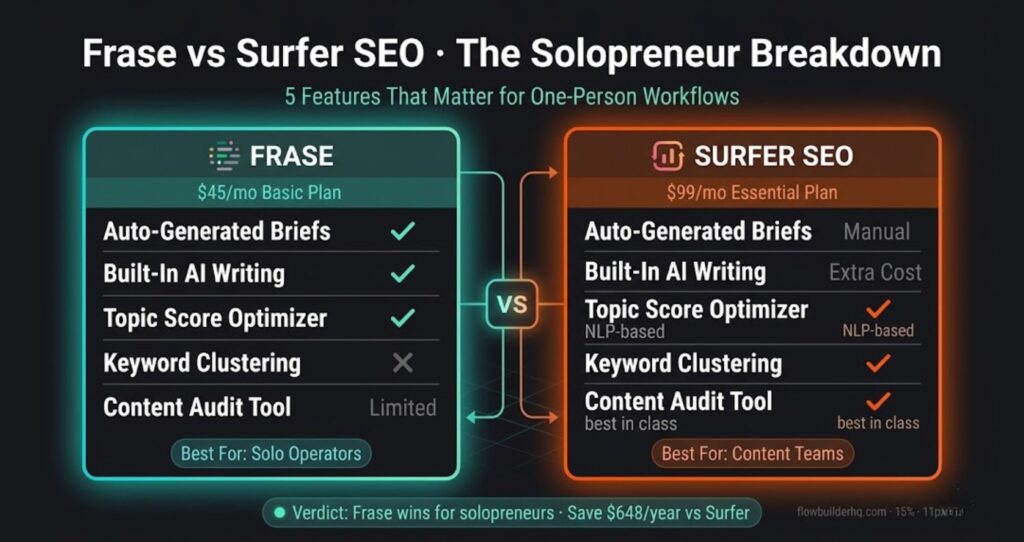
| Feature | Frase | Surfer SEO |
|---|---|---|
| Content briefs | Auto-generated from SERP, highly usable | Manual or template-based |
| On-page optimization score | Topic-based, real-time | NLP + structural, real-time |
| AI writing | Built into optimizer doc | Separate Surfer AI (extra cost) |
| Keyword research | Basic, within doc | Strong, with clustering |
| SERP analysis depth | Good — topic coverage focus | Excellent — structural + NLP |
| Audit (existing pages) | Limited | Excellent |
| Solo user pricing | $15–$45/month | $89–$129/month |
| Learning curve | Low | Medium |
| Built for teams? | No — solo-first | Yes — team-first |
| Workflow integration | Single-doc, end-to-end | Multi-step, multi-tool |
Pricing Breakdown: What You’re Actually Paying
Frase Pricing (2026)
- Solo: $15/month — 1 user, 4 documents/month (or $12.66/month billed annually)
- Basic: $45/month — 1 user, 30 documents/month (or $38.25/month billed annually)
- Team: $115/month — 3 users, unlimited documents
- SEO Add-on: $35/month for unlimited AI writing and keyword data
Surfer SEO Pricing (2026)
- Essential: $99/month — 30 Content Editor articles, 5 AI articles, 1 user (or $79/month billed annually)
- Scale: $219/month — 100 Content Editor articles, 20 AI articles, 5 users (or $175/month billed annually)
- Enterprise: custom pricing
- Add-ons: AI Tracker $95/month, additional Surfer AI articles $29 each
At the Basic tier, Frase costs $45/month versus Surfer’s $99/month Essential plan. Over 12 months, that’s $540 vs $1,188. For a solopreneur without a content team, the $648 difference either stays in your pocket or funds other tools that actually move the needle — like automating your content publishing workflow with the best automation tools for solopreneurs.ing your content publishing workflow with the best automation tools for solopreneurs.
Real Frase vs Surfer SEO Workflow: How I Run Content on FlowBuilderHQ
What a Frase-Based Workflow Actually Looks Like
A typical Frase workflow for a solopreneur runs like this:
- Enter the target keyword. SERP analysis loads in under a minute.
- Review the auto-generated brief — headings, questions, topics competitors cover. Edit it to match your angle.
- Write directly in the Frase editor. The topic score updates as you type. Target a score in the 75-85 range rather than chasing 100.
- Use the built-in AI to draft sections, then rewrite in your brand voice.
- Check the questions panel for FAQ content and search intent signals.
- Export to WordPress. Done.
That entire loop — from blank doc to publish-ready HTML — takes 1-2 hours for a 2,000-word post. The speed comes from everything living in one tool. If you have to switch between a brief tool, a writing tool, and an optimizer, you’re adding meaningful time per post and more context-switching fatigue across a week.r, I’d be adding 30–45 minutes per post and more context-switching fatigue across a week.
Where Surfer Wins (Be Honest About This)
Surfer is a better tool in specific scenarios that solopreneurs should know about:
- You have 50+ published posts and need to optimize them: Surfer’s Audit feature is unmatched. Frase’s audit capability is thin by comparison. If your growth phase is optimization over creation, Surfer earns its price.
- You care deeply about structural signals: Surfer tracks heading counts, word count ranges, image density, and paragraph length at a granular level. If you want to engineer pages to exact structural specs, Surfer gives you more levers.
- You’re scaling to a content team: Once you have editors and writers, Surfer’s multi-user features, Google Docs integration, and brief-sharing tools make more sense. Frase’s team features are functional but not the focus.
- Keyword clustering is a priority: Surfer’s keyword research and clustering tools are significantly stronger than Frase’s. If you’re doing serious topic modeling, Surfer’s the better choice.
Honest Cons of Frase
This site recommends Frase for solo operators — but you should know what you’re accepting:
- Keyword research is limited: Frase isn’t your keyword strategy tool. You’ll still want Google Search Console, Ahrefs, or at minimum Google’s free tools for keyword discovery. Frase takes over once you have a keyword — it doesn’t help you find them at scale.
- AI writing quality is inconsistent: The Frase AI is good for drafting and ideation, but it produces generic prose that needs heavy editing to match a distinct brand voice. Factor in rewrite time.
- Document limit on lower plans: The $15 Solo plan caps you at 4 documents/month. If you’re publishing more than weekly, you’re on the $45 Basic plan. The jump is justified, but it’s real.
- No Google Docs integration: If your workflow lives in Google Docs, Frase doesn’t plug in. You work in Frase’s editor or you copy-paste. Not a dealbreaker, but worth knowing.
- Audit tool is shallow: Frase’s content audit for existing pages doesn’t compete with Surfer’s. If you need to optimize a large back catalog, Surfer is the better tool for that specific job.
Automating What Comes After the Optimization
One thing neither Frase nor Surfer helps you with: what happens after you hit publish. Scheduling, internal linking checks, social distribution, CRM tagging for new subscribers — that post-publish workflow is where solopreneurs lose time.
Pairing Frase with an automation tool like Make.com covers that gap. You can build a scenario that triggers when a WordPress post goes live — auto-posts to social, notifies your email list, logs the post in a Notion or Airtable tracker, and pings you in Slack. The content side stays in Frase; the distribution side runs on Make. That combination handles the full solo content operation without adding headcount.
If you want to see how that kind of content publishing automation works in practice, the best automation tools for solopreneurs post covers the full stack worth building around.
Frase vs Surfer SEO: Who Should Use Each
Use Frase if:
- You’re a solopreneur or small team creating content regularly
- You want one tool to cover brief → write → optimize
- You’re budget-conscious and want to stay under $50/month for SEO content tooling
- You write your own content and need an in-editor workflow
- You’re building a new site and focused on creating content, not auditing it
Use Surfer if:
- You have a content team and need to share briefs and collaborate
- You have a large existing content library that needs systematic optimization
- Keyword clustering and topic architecture are your current priority
- You use Google Docs as your primary writing environment
- Budget isn’t a constraint and you want the most data-dense scoring model available
Final Recommendation
For the solopreneur doing SEO alone: start with Frase. The $45/month Basic plan gives you everything you need to research, brief, write, and optimize content — without the context-switching tax of juggling multiple tools. The workflow fits the way one person actually works.
When you’ve built a substantial content library and optimization becomes the priority over creation, that’s the right time to evaluate Surfer’s Audit tool seriously. At that stage, the $89/month makes sense as a targeted investment for a specific job. Until then, it’s paying for capabilities you won’t use.
Try Frase free for 5 days — no credit card required on the trial. Run your first keyword through it and see if the brief quality matches what you’re currently doing manually.
Building this yourself? Get the workflow pack.
5 ready-to-import n8n workflows — lead capture, invoicing, content repurposing, onboarding, social posting. Free.