How to Choose the Right Automation Tool as a Solopreneur (A Decision Framework)
Most solopreneurs pick an automation tool the wrong way. Knowing how to choose the right automation tool as a solopreneur before you spend a dollar on subscriptions is the difference between a system that works and one you abandon. They Google “best automation tool,” click the first result, sign up for a free trial, and either stick with it out of inertia or abandon it after two confusing afternoons. Then they repeat the cycle six months later with a different tool.
This post gives you a framework for making that decision once, correctly. Not a generic overview — a scored decision matrix that weighs budget, tech comfort, and use case type against the actual capabilities of the tools on the market. If you want to know how to choose the right automation tool as a solopreneur, these are the five variables that actually matter.
Before we get into tool-specific scores, one thing worth separating: this is about which tool to pick, not which tasks to automate first. If you need help with task prioritization, that framework lives in a different post. Come back here once you’ve got your list.
The 5-Variable Decision Matrix
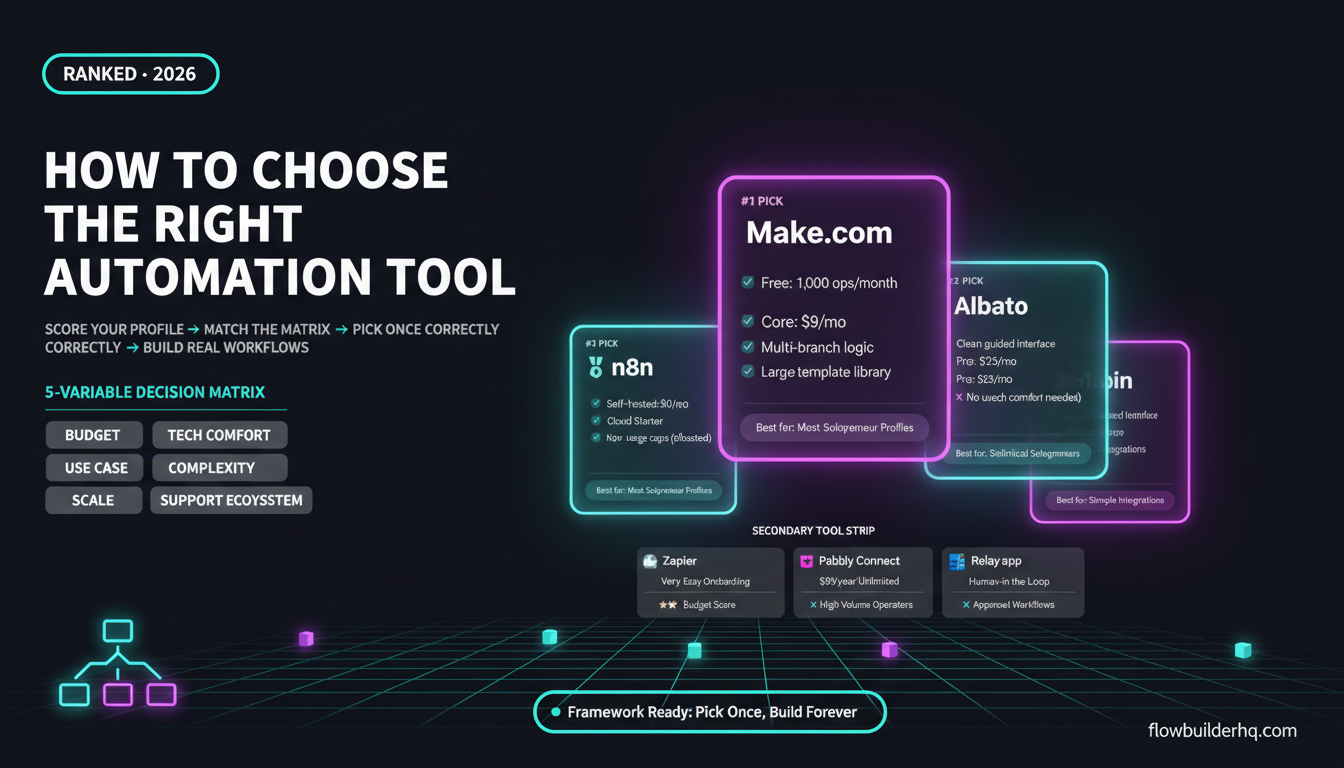
Every solopreneur’s situation is different, but tool selection comes down to five variables. Score yourself on each one — we’ll apply the scores to each tool at the end.
- Budget: What are you willing to spend per month on automation infrastructure?
- Tech comfort: How confident are you setting up multi-step workflows, handling errors, or reading JSON?
- Use case complexity: Are you connecting two apps with a simple trigger-action, or building logic-heavy workflows with branches and conditions?
- Scale: Do you need to run hundreds of automations a month or thousands?
- Support ecosystem: Do you need templates, community help, and tutorials — or are you comfortable figuring things out from documentation?
Rate yourself Low / Medium / High on each. That profile determines which tool category fits — and within that category, which specific tool wins on cost and capability.
Tool 1: Make.com — Best for Most Solopreneur Profiles
Make.com is the strongest all-around choice for solopreneurs across the widest range of profiles. It scores well on every variable except one: it has a steeper learning curve than a pure drag-and-drop tool like Zapier during the first hour. After that hour, the logic starts making sense fast.
Who it fits: Medium to high tech comfort. Use cases ranging from simple two-app connections all the way to multi-branch workflows with filters, routers, and error handling. Budget-conscious operators who need volume without paying Zapier prices.
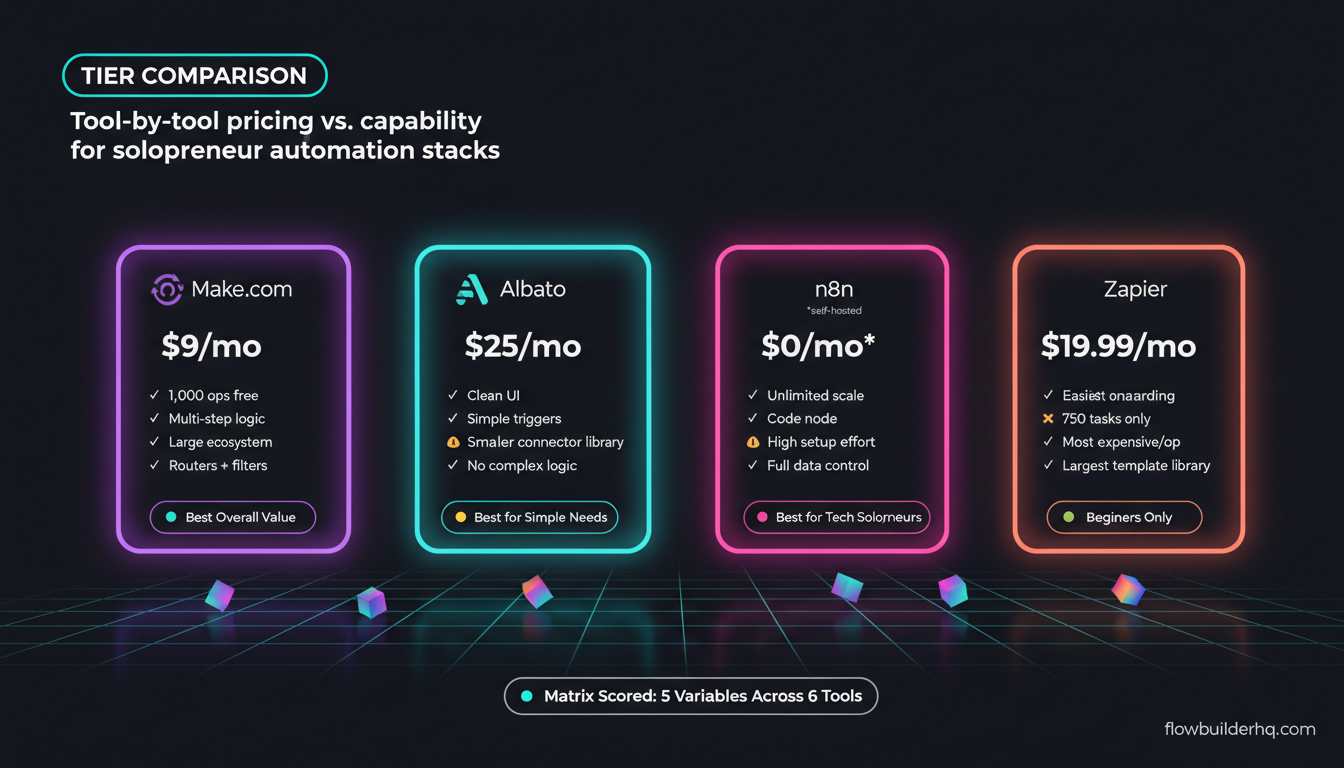
Pricing: Free plan includes 1,000 operations/month. Core is $9/mo. Pro is $16/mo. Teams is $29/mo. That pricing scale is hard to beat — the cost difference versus Zapier becomes dramatic at any meaningful operation volume.
Where it scores highest in the matrix:
- Budget: High — cheapest paid tier at $9/mo with a usable free plan
- Tech comfort required: Medium — the visual canvas is intuitive but not instant
- Use case complexity: High — handles conditional logic, data transformation, multi-step workflows natively
- Scale: High — operations-based pricing means you pay for what you use
- Support ecosystem: High — extensive template library, active community, and a large body of third-party tutorials
Real con: The operations model means complex scenarios burn ops faster than you expect, especially with polling triggers. You need to understand how ops are counted before you design your workflows — otherwise your free 1,000/month disappears in two days. The error handling system also requires deliberate setup; it doesn’t protect you automatically.
For solopreneurs building real business infrastructure — client onboarding, lead routing, reporting, content distribution — Make.com is the tool that grows with you without forcing a platform switch. Try Make.com free and test it against your actual use cases before committing to anything else.
Tool 2: Albato — Best for Simple Integration Needs on a Tight Budget
Albato is the tool most solopreneurs haven’t heard of, and it deserves more attention for a specific profile: someone who needs straightforward app-to-app connections, doesn’t want to think about workflow logic, and wants a clean interface without the Zapier price tag.
Who it fits: Low to medium tech comfort. Simple trigger-action automations. Solopreneurs focused on specific integrations (CRM updates, form submissions, notification routing) rather than complex data manipulation.
Pricing: Free trial available. Pro is $25/mo. Business is $59/mo.
Where it scores in the matrix:
- Budget: Medium — cheaper than Zapier’s paid tiers but more expensive than Make.com Core for equivalent simplicity
- Tech comfort required: Low — the interface is clean and the setup path is more guided than Make.com
- Use case complexity: Low to medium — handles connections well, not ideal for logic-heavy scenarios
- Scale: Medium — works well for moderate automation volume
- Support ecosystem: Medium — smaller community than Make.com or Zapier, but documentation is solid
Real con: Albato’s connector library is smaller than Make.com’s. If you’re working with niche tools or need custom webhooks wired into complex logic, you’ll hit its ceiling faster than you expect. It’s optimized for coverage of common apps, not for building sophisticated automation architecture.
If you’ve looked at the options and decided your needs are genuinely simple — you’re connecting five apps, running straightforward triggers, and you don’t see that changing — Albato is a legitimate choice that won’t overwhelm you. Check out Albato’s plans here.
Tool 3: n8n — Best for High-Tech Solopreneurs Who Want Full Control
n8n sits in its own category: it’s the automation platform for solopreneurs who are comfortable with code, want complete ownership of their data, and are willing to trade setup complexity for long-term flexibility and cost savings.
Who it fits: High tech comfort. Use cases that require custom code nodes, API calls to services without native connectors, or sensitive data that can’t touch third-party servers. Solopreneurs who want to self-host on their own infrastructure and pay nothing per month beyond hosting costs.
Pricing: Self-hosted is free. Cloud Starter is $8/mo. Cloud Pro is $50/mo. The self-hosted route is what makes this interesting — $0/mo automation infrastructure if you have a server or a cheap VPS.
Where it scores in the matrix:
- Budget: Very high if self-hosting — potentially the cheapest long-term option
- Tech comfort required: High — setup, maintenance, and debugging require comfort with servers or at minimum cloud VPS management
- Use case complexity: Very high — the code node makes almost anything possible
- Scale: Very high on self-hosted (no usage caps)
- Support ecosystem: Medium — strong community forums and official n8n documentation are good, but fewer beginner tutorials than Make.com
Real con: Self-hosting n8n is not a Sunday afternoon project if you’ve never run a server. The n8n Cloud offering simplifies this, but at $50/mo for Pro, you lose the cost advantage that makes n8n compelling in the first place. And the interface, while powerful, is not as visually intuitive as Make.com’s canvas. If you’re not comfortable in a terminal, this is the wrong starting point.
Tool 4: Zapier — Best for Absolute Beginners Who Need Speed Over Value
Zapier is the most-mentioned automation tool in every generic listicle, and it’s genuinely the easiest to get started with. But for solopreneurs who are cost-conscious — which is most of you reading this — it’s hard to justify at scale.
Who it fits: Low tech comfort. Needs fast setup. Working with very mainstream apps. Volume is low (under a few hundred tasks/month). Not yet sure automation will stick as a habit.
Pricing: Free plan covers 100 tasks/month. Starter is $19.99/mo. Professional is $69/mo. Those numbers escalate fast when you start running real workflows — the pricing math comparison against Make.com is stark.
Where it scores in the matrix:
- Budget: Low — the most expensive option per operation at scale
- Tech comfort required: Very low — genuinely the easiest onboarding of any tool in this list
- Use case complexity: Low to medium — added multi-step and conditional logic in recent updates, but still limited compared to Make.com or n8n
- Scale: Low — task-based pricing punishes growth
- Support ecosystem: Very high — the largest library of Zap templates, the most tutorials, the widest app coverage
Real con: You will almost certainly outgrow Zapier’s free plan within your first month of serious automation. Once you hit Starter at $19.99/mo for 750 tasks, you’re paying more than Make.com Core for less volume and fewer features. The ease of use is real — but you’re paying a significant premium for it.
Tool 5: Pabbly Connect — Best for High-Volume, Budget-Locked Workflows
Pabbly Connect is the outlier in this list: it’s the only major automation platform with a task-unlimited pricing model, which means it appeals to a very specific solopreneur profile.
Who it fits: Medium tech comfort. High automation volume. Workflows that would cost $50-100+/month on other platforms. Willing to trade polish and ecosystem depth for a flat cost.
Pricing: Annual plan at $99/year. Pro at $179/year. Lifetime promos run periodically. No per-task pricing on paid plans — that’s the entire selling point.
Where it scores in the matrix:
- Budget: Very high for high-volume users — $99/year beats most tools at 10,000+ tasks/month
- Tech comfort required: Medium — more complex than Zapier, less polished than Make.com
- Use case complexity: Medium — handles multi-step workflows but the UI is rougher than Make.com
- Scale: Very high if volume is the constraint
- Support ecosystem: Low to medium — the community is smaller and the documentation is inconsistent
Real con: Pabbly’s interface hasn’t kept pace with Make.com or n8n in terms of visual quality and debugging tools. When a workflow breaks, figuring out why takes longer. The connector library covers mainstream apps well but has gaps. And the “unlimited” model has fair-use nuances buried in the terms — read them before you assume unlimited means unlimited. Check the full comparison between Make.com and Pabbly Connect if you’re deciding between the two.
Tool 6: Relay.app — Best for Solopreneurs Who Want Human-in-the-Loop Automation
Relay.app is a newer entrant that solves a real problem most automation tools ignore: what happens when you don’t want full automation, but you want human approval or input baked into the workflow?
Who it fits: Low to medium tech comfort. Workflows that require a judgment call before action — approving a drafted email, reviewing a parsed lead before it hits the CRM, confirming a refund before it processes. Teams of 1-3 where someone needs to stay in the loop.
Pricing: Check current pricing on Relay.app’s official site — pricing varies and changes frequently.
Where it scores in the matrix:
- Budget: Medium — competitive for what it offers, but not the cheapest option
- Tech comfort required: Low — designed for non-technical users
- Use case complexity: Medium — excels at human-in-the-loop flows, not at pure data transformation
- Scale: Medium
- Support ecosystem: Low to medium — newer platform, smaller community, but well-documented
Real con: Relay.app’s strength is also its limitation. If you want fully automated pipelines that run without human touchpoints, you’ll find it overkill for simple workflows and underpowered for complex ones. It fills a specific niche — not a general-purpose platform. Also, the connector library is still growing; some of your apps may not be supported yet.
Tool 7: Pabbly Connect vs. Everything Else — When the Math Doesn’t Favor Per-Op Pricing
Wait — that’s already covered above as Tool 5. So let’s use this slot for the real question: what if none of the above fit?
How to Choose the Right Automation Tool When You’re Still Unsure
If you’ve read through all six tools and you’re still not sure, use this tie-breaker logic:
- If you’ve never built an automation before: Start with Make.com’s free plan. The 1,000 ops/month is enough to test 3-4 real workflows. Don’t start with Zapier just because it’s easier — you’ll pay more when you scale and switch anyway. There are plenty of resources to help you build your first Make.com scenario without prior experience.
- If you need simple connections fast and hate UI complexity: Try Albato. It’s genuinely cleaner for basic use cases and the pricing at $25/mo Pro is fair for what you get.
- If you’re self-hosting already or comfortable with servers: n8n is worth the learning curve. The long-term cost savings are real.
- If you’re running volume above 10,000 tasks/month: Run the Pabbly vs. Make.com math against your actual numbers. At that volume, the one-time annual cost changes the equation.
- If your workflows require human review steps: Relay.app is the only tool in this list built specifically for that pattern.
One thing that helps before you commit: map out your actual workflow first. Not the ideal version — the real one you need now. Then match it to the matrix. Most solopreneurs discover their needs are simpler than they imagined, which usually points back to Make.com Core at $9/mo as the right starting point. If you want a sense of what those real-world workflows look like in practice, that’s a useful reference before you commit to any platform.
Decision Matrix Summary Table
| Tool | Budget Score | Tech Comfort Needed | Complexity Ceiling | Scale | Ecosystem | Best For |
|---|---|---|---|---|---|---|
| Make.com | ★★★★★ | Medium | High | High | Strong | Most solopreneur profiles |
| Albato | ★★★★ | Low | Medium | Medium | Medium | Simple integrations, lower complexity |
| n8n | ★★★★★ (self-hosted) | High | Very High | Very High | Medium | Technical solopreneurs, data control |
| Zapier | ★★ | Very Low | Medium | Low | Very Strong | Absolute beginners, low volume |
| Pabbly Connect | ★★★★★ (high volume) | Medium | Medium | Very High | Low–Medium | High-volume, budget-locked operators |
| Relay.app | ★★★ | Low | Medium | Medium | Low–Medium | Human-in-the-loop workflows |
The Honest Answer on How to Choose the Right Automation Tool
For the majority of solopreneurs reading this — non-technical to moderately technical, running a service business or content operation, spending under $50/month on tools — Make.com wins the matrix. It has the best combination of pricing, flexibility, and ecosystem depth for one-person businesses. If your situation is genuinely simple and you want a gentler learning curve, Albato is the legitimate alternative worth testing.
The worst outcome isn’t choosing the “wrong” tool — it’s spending months evaluating instead of building. Pick one, build three workflows, see what you hit. The friction points you run into will tell you more than any comparison post ever could. For context on how this fits into a broader solopreneur tech stack for 2026, that post maps the full picture of what tools actually run a one-person business.
If you’re ready to test Make.com, the free plan is a real starting point — not a crippled demo. Start your Make.com free plan here and run it against your actual use case before committing to any paid tier. That’s the right way to make this decision.
And if you want to understand the full cost picture before signing up for anything, the Make.com pricing breakdown covers what you’ll actually pay across plans — including how operations get counted in ways that can surprise new users.
Building this yourself? Get the workflow pack.
5 ready-to-import n8n workflows — lead capture, invoicing, content repurposing, onboarding, social posting. Free.