Make.com Pricing vs Zapier : The Real Cost at 5K, 20K, and 50K Operations
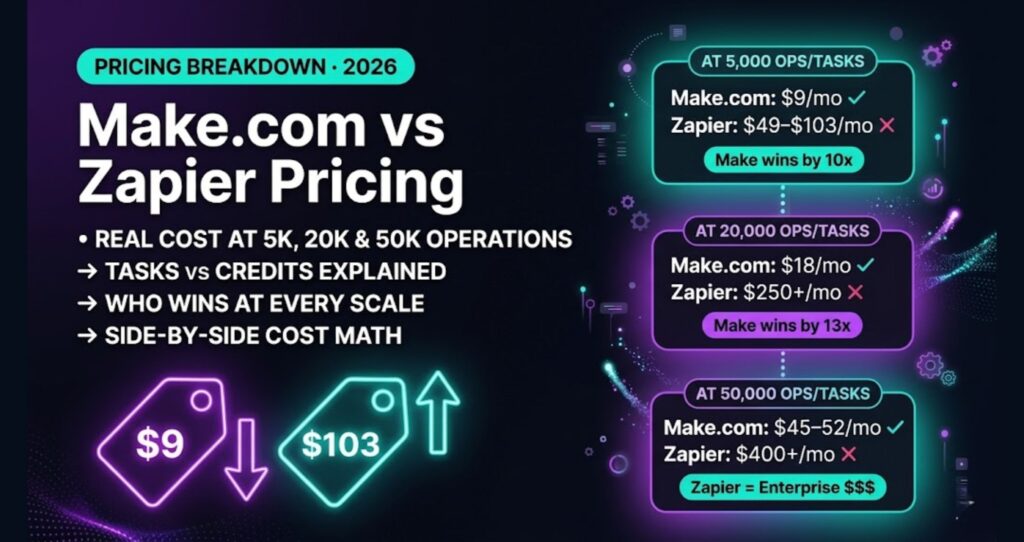
Make.com pricing vs Zapier pricing looks simple until you run the real numbers — and at any meaningful scale, the gap between them isn’t close. Zapier sells tasks. Make.com sells credits. These aren’t the same thing, and the difference gets brutal at volume.
Make.com pricing is verified against make.com/pricing, current as of 2026. Zapier pricing is sourced from their current public pricing page.
Here’s what this comparison does: it runs the pure math at three real usage levels — 5,000, 20,000, and 50,000 monthly operations — and tells you which platform costs less at each tier, and why.
How Each Platform Counts Usage
Before the math, you need to understand what you’re actually buying.
Make.com: Operations
Make.com charges by operations. Every module that executes in a scenario counts as one operation. A scenario with a trigger, two data-transform steps, and an action that sends an email = 4 operations per run. A scenario that runs 1,000 times per month with that structure = 4,000 operations.
This is actually generous for simple automations. A two-step Zap equivalent in Make.com might only cost 2 operations per run instead of what Zapier would charge as 1 task — but the pricing per unit is far cheaper, so it evens out and then some at volume.
Zapier: Tasks
Zapier charges by tasks. The trigger step is free. Every action step after the trigger costs 1 task. A Zap with 1 trigger and 2 actions = 2 tasks per run. At 1,000 runs/month, that’s 2,000 tasks.
Where Zapier gets expensive fast: multi-step Zaps. Their premium plans are required for multi-step automation, which means you’re paying a plan premium and burning tasks faster.
Current 2026 Pricing: Make.com vs Zapier
| Plan | Platform | Monthly Price (annual) | Included Tasks/Credits | Overage |
|---|---|---|---|---|
| Free | Make.com | $0 | 1,000 credits/mo | N/A |
| Core | Make.com | $9/mo | 10,000 credits/mo | ~$9 per 10K |
| Pro | Make.com | $16/mo | 10,000 credits/mo | ~$9 per 10K |
| Teams | Make.com | $29/mo | 10,000 credits/mo | ~$9 per 10K |
| Free | Zapier | $0 | 100 tasks/mo | N/A |
| Professional | Zapier | $19.99/mo | 750 tasks/mo | Overage applies |
| Professional | Zapier | $49/mo | 2,000 tasks/mo | Overage applies |
| Team | Zapier | $69/mo | 2,000 tasks + shared workspace | Overage applies |
| Team | Zapier | $103.50/mo | 2,000 tasks + premier support | Overage applies |
Make.com pricing verified from firsthand billing. Zapier pricing sourced from Zapier’s public pricing page, current as of 2026.
Note on Make.com operation add-ons: You can purchase additional operation bundles on top of any paid plan. The Core plan at $9/mo includes 10K ops, and you can stack more in 10K increments at roughly $9 each. This makes scaling genuinely predictable — you’re not forced into a whole new plan tier every time you grow.
The Math at 5,000 Monthly Operations
At 5,000 operations per month, you’re a solopreneur running a few active workflows — maybe lead capture, a client onboarding sequence, and some reporting automation.
Make.com at 5K ops
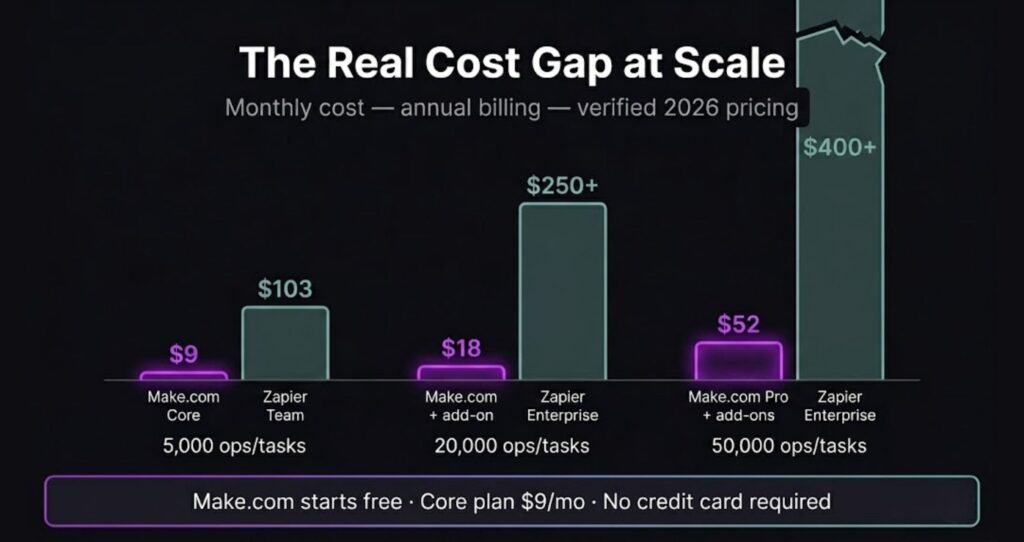
The Core plan at $9/mo includes 10,000 operations. You’re at 5,000 — you’re covered with headroom to spare. Cost: $9/mo.
Zapier at ~5K tasks
Zapier’s task-to-operation ratio isn’t 1:1, but for a fair comparison, assume you’re running similar workflows. At 5,000 tasks, you’d need Zapier’s Team plan. The $69/mo tier gives you 2,000 tasks with a shared workspace — but true 5K task volume pushes you to the $103.50/mo Team tier.
Best case (if your actual task count is lower due to simple Zaps): $49/mo. Realistic case at true 5K task volume: $103.50/mo.
Winner at 5K: Make.com by a wide margin
Make.com costs $9/mo. Zapier costs $49–$103.50/mo for comparable volume. That’s a 5x to 11x price difference. Even if your Make.com scenarios are slightly credit-heavier than equivalent Zaps, you’d need to run deeply inefficient workflows to close that gap.
The Math at 20,000 Monthly Operations
At 20,000 operations per month, you’re running serious automation — multiple client workflows, recurring data syncs, maybe AI-assisted content or CRM updates running several times daily.
Make.com at 20K ops
Core plan includes 10K ops. You need one additional 10K operation bundle at ~$9. Total: $18/mo. That’s it. No plan upgrade required. No sales call. Just add the bundle in your dashboard.
Zapier at ~20K tasks
Zapier has no clean 20,000-task tier on public plans. The Team plan tops out at 2,000 tasks at $103.50/mo — nowhere near 20K. At this volume you’re in Enterprise territory, requiring a sales conversation with custom pricing.
Estimated cost: $250+/mo (Enterprise, contact required).
Winner at 20K: Make.com, and it’s not close
Make.com: $18/mo. Zapier: $250+/mo and you’re in enterprise negotiations. That’s more than 13x the price. At this usage level, the structural difference in how the two platforms price credits vs. tasks becomes a genuine business decision, not just a preference.
The Math at 50,000 Monthly Operations
At 50,000 operations per month, you’re running automation as a core part of your business infrastructure. Client deliverables, internal ops, and customer-facing workflows are all automated.
Make.com at 50K ops
Start with Core at $9/mo (10K ops included). Add four additional 10K bundles at ~$9 each = $36 in add-ons. Total: $45/mo.
Alternatively, the Pro plan at $16/mo includes the same 10K base ops but adds features like custom variables, longer execution history, and higher priority execution. With 40K in add-on ops: $16 + $36 = $52/mo. Worth it if you need those features.
Zapier at ~50K tasks
Zapier’s public pricing doesn’t show a clean 50,000-task tier on their standard plans. You’d be looking at enterprise pricing, which requires contacting their sales team. Based on their published scaling, you’re likely looking at $400–$600+/mo, but this is an estimate — Zapier doesn’t publish per-unit overage costs at this level clearly.
Estimated cost: $400+/mo (enterprise, contact required).
Winner at 50K: Make.com, decisively
Make.com: $45–$52/mo. Zapier: $400+ and you’re in enterprise negotiation territory. If you’re running 50K monthly operations and paying Zapier rates, you’re likely overpaying by $350+ every single month.
Side-by-Side Cost Summary
| Monthly Volume | Make.com Cost | Zapier Cost | Make.com Savings |
|---|---|---|---|
| 5,000 ops/tasks | $9/mo | $49–$103.50/mo | ~$40–$95/mo |
| 20,000 ops/tasks | $18/mo | $250+/mo (Enterprise) | ~$230+/mo |
| 50,000 ops/tasks | $45–$52/mo | $400+/mo (Enterprise) | ~$350+/mo |
Where Zapier’s Pricing Makes Sense
Being straight here: Zapier isn’t a bad product. Its pricing can make sense in specific situations.
- You need instant setup with zero learning curve. Zapier’s interface is faster to get started with for genuinely non-technical users. If your team maxes out at 100 tasks/month and pays $0, the free plan is fine.
- You’re connecting niche apps that only Zapier supports. Zapier has a larger app library. If your critical tool only has a Zapier integration, that’s a real constraint.
- Your volume genuinely stays under 750 tasks/month. The $19.99/mo Professional plan covers 750 tasks. If you stay under that and want the simplicity, the premium over Make.com Core isn’t enormous.
But past 750 tasks per month? Zapier’s pricing model starts working against you hard.
Honest Cons of Make.com (Since You Should Know)
Make.com wins the pricing math clearly, but it’s not a perfect product.
- Steeper learning curve. Make.com’s visual scenario builder is more powerful but takes longer to learn than Zapier’s linear Zap editor. Expect a few hours of real investment before you’re productive.
- Error handling is your responsibility. Make.com gives you more control, which means you need to think through error routes and filters yourself. Zapier holds your hand more.
- Credits can add up unexpectedly. If you build a scenario with many modules running on a tight loop, you can burn through credits faster than planned — worth monitoring closely in your first 30 days.
- App library is smaller than Zapier’s. Most major tools are covered, but if you’re in a niche stack, check Make.com’s integration list before switching.
For a deeper look at the product itself beyond pricing, read the Make.com Review 2026.
Make.com vs Zapier: Beyond the Price Tag
Pricing is the clearest differentiator, but it’s not the only one. Make.com gives you:
- Visual scenario flow that shows data moving between modules in real time
- Native data transformation tools (no need to add extra steps for basic manipulation)
- Multi-step, multi-path scenarios on every paid plan — no premium tier required
- More granular scheduling and trigger options
Zapier gives you:
- Faster initial setup
- More native app integrations
- A more guided, linear automation experience
- Better brand recognition (matters if you’re building automations for clients who need to maintain them)
If you’re choosing between the two for a freelance or agency context where you’ll hand off workflows to clients, check the full breakdown at n8n vs Make.com for Small Business — it covers how Make.com holds up against other platforms on usability and handoff, not just price.
Who Should Choose Make.com
- Solopreneurs running more than 750 tasks/month who want to stop overpaying
- Anyone building multi-step workflows as a core part of their business
- Freelancers and small teams who need predictable, scalable pricing
- Users comfortable spending a few hours learning a more powerful tool
For the freelancer angle specifically, see Make.com for Freelancers — it covers how to structure client scenarios and what the billing looks like in a real services business.
Who Should Stick With Zapier
- Teams locked into apps that aren’t on Make.com
- Users who need enterprise-level support and compliance documentation
- Anyone who genuinely can’t invest time in a learning curve and stays under 750 tasks/month
Make.com Pricing vs Zapier: The Verdict
The Make.com pricing vs Zapier comparison has a clear winner at every usage level above 750 tasks per month. Make.com is cheaper at every meaningful scale.
The pricing structure — operations bought in flat bundles — makes Make.com predictable in a way Zapier’s task-tier model isn’t. You know what you’re paying. You add bundles when you need them. There’s no forced plan jump when you cross an arbitrary threshold.
If price is the question, Make.com is the answer at any meaningful scale.
Start with Make.com free — 1,000 operations/month, no credit card required.
Zapier affiliate link: [PLACEHOLDER — affiliate application pending]
Want to see how Make.com billing plays out in a real invoicing workflow? Read How to Automate Invoicing with Make.com.
[mailerlite_form form_id=1]Building this yourself? Get the workflow pack.
5 ready-to-import n8n workflows — lead capture, invoicing, content repurposing, onboarding, social posting. Free.