n8n vs Make.com for Small Business: Which One Should You Use?
Quick Verdict
n8n vs Make.com Make.com wins for non-technical small business owners. The visual canvas, readable error handling, and lower setup friction make it the right default for anyone who wants automation running without developer support.
n8n wins for technical users and high-volume workflows. Self-hosted n8n on a $5/month VPS processes unlimited executions — and the workflow builder is more powerful for complex logic, API integrations, and AI-connected workflows.
If you’re running a 1–10 person business and nobody on the team writes code, start with Make.com. If you have technical tolerance and expect to scale, n8n is the better long-term investment.
Who This Comparison Is For
This post is written for small business owners, solopreneurs, consultants, and freelancers making a first automation tool decision in 2026. Not for enterprise teams evaluating vendor contracts. Not for developers who already know what they want.
If you’re trying to automate CRM updates, client onboarding, invoicing, email sequences, or lead routing — without hiring a developer — this comparison covers what actually matters for your use case.
Side-by-Side Overview
| Make.com | n8n | |
|---|---|---|
| Interface | Visual canvas, drag-and-drop | Node-based visual editor |
| Technical requirement | None | Low–Medium |
| Starting price | $9/month (Core) | $8/month Cloud / $0 self-hosted |
| Free tier | Yes — 1,000 ops/month | 14-day trial (Cloud) |
| Execution model | Per operation | Per workflow run |
| Self-hosting | No | Yes |
| Error handling | Visual, readable, re-run from failure | Execution logs, requires more debugging |
| App integrations | 1,500+ native | 400+ native + community nodes |
| AI/LLM integration | Via HTTP module | Via HTTP Request node + community nodes |
| Best for | Non-technical teams, visual debugging | Developers, high volume, data control |
Pricing — The Real Comparison
Pricing between these two tools is harder to compare than it looks because they use different execution models.
Make.com charges per operation. Every action in a workflow counts as one operation. A 5-step scenario that runs 100 times uses 500 operations.
n8n charges per workflow execution. One full run of any workflow — regardless of node count — counts as one execution. A 10-node workflow running 100 times uses 100 executions.
This means n8n’s execution model is significantly more generous for complex multi-step workflows. Make.com’s model is cheaper for simple 2–3 step automations at high volume.
Make.com pricing:
| Plan | Price | Operations/Month |
|---|---|---|
| Free | $0 | 1,000 |
| Core | $9/month | 10,000 |
| Pro | $16/month | 10,000 + 1-min scheduling |
| Teams | $29/month | 10,000 + collaboration |
n8n pricing:
| Plan | Price | Executions/Month |
|---|---|---|
| Self-hosted | $0 (VPS ~$5/month) | Unlimited |
| Cloud Starter | $8/month | 2,500 |
| Cloud Pro | $20/month | 10,000 |
| Cloud Pro+ | $50/month | 50,000 |
The break-even math: A 5-step Make.com workflow running 2,000 times per month uses 10,000 operations — hitting the Core plan ceiling. The same workflow in n8n Cloud uses 2,000 executions — well within the Starter plan. For complex workflows at volume, n8n is cheaper at every tier.
Interface and Ease of Use
This is where Make.com wins clearly and consistently.
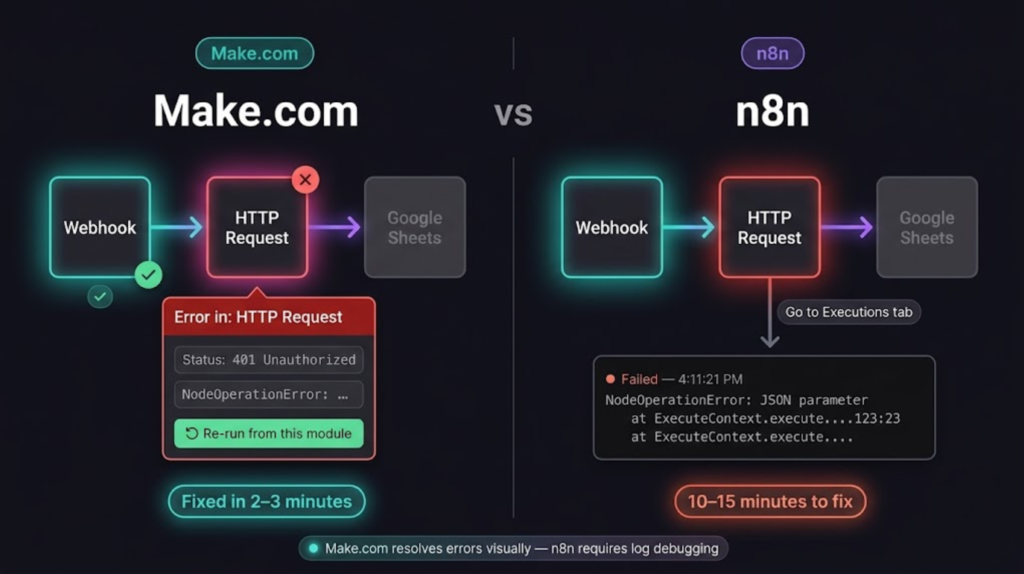
Make.com’s scenario canvas shows you the entire workflow as a connected diagram. Data flows left to right between modules. You click any module mid-run and see exactly what JSON is passing through it. When something fails, the error panel shows the exact module, the exact data that caused the failure, and gives you a one-click option to re-run from that point with corrected data.
n8n’s workflow editor is also visual — node-based, with a similar left-to-right flow. But the debugging experience is less polished. Errors surface in the Executions tab rather than inline on the canvas. For non-technical users, reading an n8n error log is harder than reading Make.com’s visual error panel.
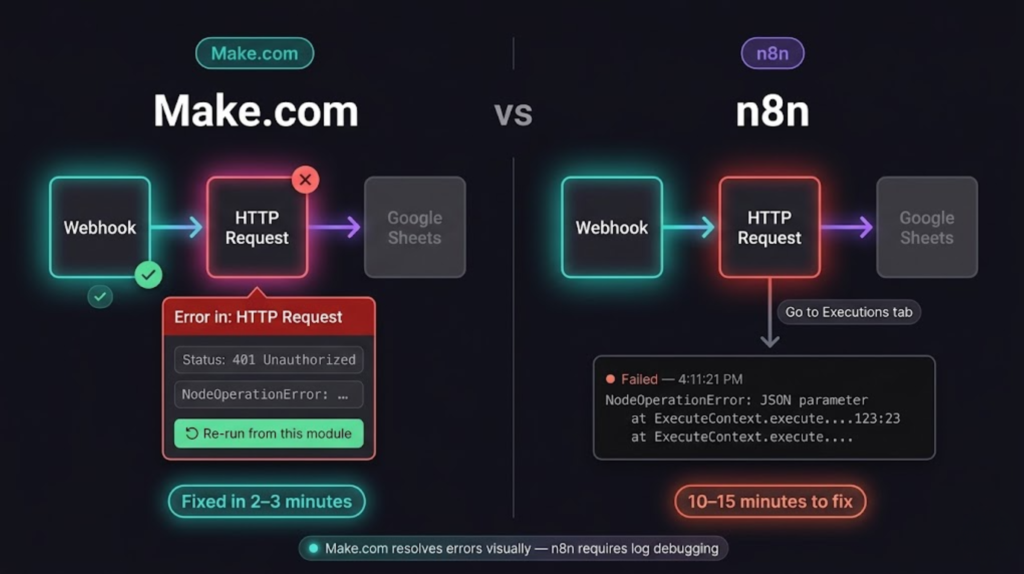
Real difference in practice: A non-technical business owner troubleshooting a broken lead routing workflow will resolve it in 3–5 minutes in Make.com. The same fix in n8n requires finding the failed execution, reading the log, identifying which node failed, and knowing enough about the data structure to fix the mapping. Doable — but slower and less intuitive.
Workflow Capability
Both tools handle standard business automation — CRM updates, email triggers, form processing, data routing. The differences show up at the edges.
Make.com advantages:
- Router module handles conditional branching cleanly — multiple paths from a single trigger without complex logic
- Iterator module processes arrays item by item without custom code
- Built-in data transformation tools (string manipulation, date formatting, math) are accessible without writing expressions
- Aggregator module combines multiple items back into one — useful for batch processing
n8n advantages:
- Code node lets you write JavaScript directly inside the workflow — no workaround needed for complex logic
- HTTP Request node gives full API control — custom headers, authentication methods, response parsing
- Better AI and LLM integration — connecting Claude, OpenAI, or any model API is cleaner and more flexible
- Function items, merge nodes, and split operations are more powerful for data engineering tasks
- Community nodes extend the integration library beyond the 400+ official nodes
For typical small business workflows — client onboarding, invoice follow-up, lead routing, CRM sync — both tools handle the job. Make.com gets you there faster. n8n handles edge cases better once you know what you’re doing.
Integrations
Make.com connects to 1,500+ apps natively. n8n connects to 400+ natively, with community nodes adding hundreds more.
For small business workflows, this gap matters less than it sounds. The apps that actually come up — HubSpot, Gmail, Google Sheets, Slack, Notion, Typeform, Stripe, Airtable — are on both platforms. You’re unlikely to hit a Make.com integration that doesn’t exist in n8n for standard business tools.
Where the gap shows up: niche or newer SaaS tools. Make.com’s larger native library means obscure tools are more likely to have a pre-built module. n8n’s HTTP Request node covers anything with an API — but requires manual configuration rather than a guided setup.
Error Handling — Make.com’s Biggest Advantage
Make.com:
- Failed executions are visible on the scenario canvas — the failed module turns red
- Click the red module → see the exact input data, the error message, and what the API returned
- One-click re-run from the failed module with corrected data — no lost records, no manual reprocessing
- Error routes let you handle failures automatically — if HubSpot contact creation fails, route to a fallback action instead of stopping
n8n:
- Failed executions appear in the Executions tab with a red status
- Click the execution → see the input/output at each node
- Re-run the entire workflow from the start — not from the failed node
- Error workflow feature lets you trigger a separate workflow on failure — more flexible but requires more setup
For a non-technical operator running a client-facing workflow, Make.com’s error recovery is meaningfully better. A broken onboarding workflow at 9pm is a 2-minute fix in Make.com. In n8n, it’s a 10-minute debugging session if you know what you’re doing — longer if you don’t.
AI and Automation in 2026
Both tools connect to Claude and OpenAI via native modules — this is no longer an HTTP-only workaround. Make.com has a native Anthropic Claude module that handles API calls without writing raw JSON. n8n has both the HTTP Request node and purpose-built community nodes for Claude and OpenAI.
The difference is depth, not access. n8n gives you full control over every parameter — system prompts, token limits, custom headers, response parsing — directly in the node configuration. Make.com’s Claude module covers standard prompt-in, response-out use cases cleanly, but hits limits when you need complex prompt structures or multi-step AI logic.
For basic AI tasks — summarizing, drafting, classifying — both tools work. For AI-connected workflows with conditional logic, structured outputs, or chained model calls, n8n handles it with less friction.
Who Should Use Make.com
Make.com is the right choice if:
- You’re a small business owner or solopreneur without developer support
- You want workflows running this week without a learning curve
- Your team needs to read and edit automations without technical training
- Error visibility and fast recovery matter more than raw power
- You’re running standard business workflows — CRM, email, invoicing, onboarding
- You process under 10,000 operations per month
The Core plan at $9/month covers most small business automation needs. Start there.
Who Should Use n8n
n8n is the right choice if:
- You have technical tolerance — comfortable with JSON, APIs, and basic debugging
- You’re building AI-connected workflows that need more than basic HTTP calls
- You need self-hosted infrastructure for data control or compliance
- Your workflow volume makes Make.com’s operation-based pricing expensive
- You want code-level control inside workflows without workarounds
- You’re running a developer-led team or have a technical co-founder
Self-hosted n8n on a $5/month Hetzner VPS is the best value in automation infrastructure for technical users. Cloud Starter at $8/month is the right entry point if you want managed infrastructure without the setup. → Try n8n Cloud
Self-hosted n8n on a $5/month Hetzner VPS is the best value in automation infrastructure for technical users. Cloud Starter at $8/month is the right entry point if you want managed infrastructure without the setup.
The Recommendation
Default to Make.com. For the majority of small business owners reading this, Make.com is the faster path to working automation. The $9/month Core plan, the visual error handling, and the lower learning curve make it the right starting point for anyone who isn’t already comfortable with APIs and JSON.
Move to n8n when: your operation count makes Make.com expensive, you need self-hosting, or you’re building AI-connected workflows that require more flexibility than Make.com’s HTTP module provides.
The good news: switching between the two isn’t a full rebuild. The workflow logic is the same — you’re re-implementing the same connections in a different interface. Most workflows migrate in 1–2 hours once you know both tools.
Make.com is the right starting point for most small businesses — start a free trial and build your first workflow in under 30 minutes.
→ Try Make.com
Want to go deeper on either platform? The full n8n review covers the honest pros and cons for non-developers, and the Make.com review does the same for the visual-first crowd. If you’re leaning toward n8n, the self-hosted vs Cloud breakdown walks through the deployment decision. And for the broader picture, see the best automation tools for solopreneurs in 2026.
Building this yourself? Get the workflow pack.
5 ready-to-import n8n workflows — lead capture, invoicing, content repurposing, onboarding, social posting. Free.