Make.com vs Pabbly Connect for Solopreneurs: Honest Comparison

Pabbly’s lifetime deal looks tempting — here’s when it actually costs you more.
On paper, Pabbly Connect is an easy call. Pay once, automate forever, forget monthly bills. That pitch lands hard when you’re watching your SaaS subscriptions stack up. But Make.com vs Pabbly Connect for solopreneurs isn’t really a pricing debate — it’s a capability debate. And once you stress-test both platforms with real multi-step workflows, the gap becomes hard to ignore.
This comparison is for solopreneurs who have outgrown simple two-step zaps and need workflows that branch, filter, handle errors gracefully, and run without babysitting. If that’s you, read this before you buy a lifetime deal you’ll regret.
What Each Platform Actually Is
Make.com (formerly Integromat) is a visual workflow builder built around a scenario canvas. Modules connect left to right, routers split paths, iterators loop through arrays, and the error-handling tools are first-class citizens of the interface — not an afterthought. It’s the platform covered in depth in our full Make.com review.
Pabbly Connect is a trigger-action automation tool closer in structure to older-generation Zapier. It gained serious traction through aggressive lifetime deal pricing — $99/year or periodic one-time offers — and it covers a wide app library. For single-trigger, single-action workflows, it works. The problems surface when workflows get longer and more conditional.
Make.com vs Pabbly Connect: Feature Comparison
| Feature | Make.com | Pabbly Connect |
|---|---|---|
| Visual workflow builder | Full canvas with modules | Linear step-based UI |
| Conditional routing | Router with multiple paths, filters on each branch | Conditions exist but limited branching depth |
| Error handling | Dedicated error handlers, rollback, resume options | Basic — limited retry logic |
| Iterator / aggregator | Native iterator, array aggregator, text aggregator | Not natively available |
| Webhooks | Full custom webhook support with data parsing | Webhook triggers available, less configurable |
| Data transformation | Built-in functions, formula bar, JSON parsing | Limited inline data manipulation |
| Scheduling granularity | Down to the minute on paid plans | Flexible but less granular on lower tiers |
| App library | 1,500+ apps | 1,000+ apps |
| Free tier | 1,000 ops/month | None (paid plans start at $99/year) |
| Pricing model | Subscription (monthly/annual) | Annual or lifetime one-time |
Where Pabbly Connect Falls Short for Complex Workflows
The core issue with Pabbly Connect isn’t what it does — it’s what it can’t do when a workflow gets messy. And real solopreneur workflows always get messy.
Branching logic is shallow. Make.com’s router lets you create multiple independent paths from a single module, each with its own filter conditions. Pabbly’s conditional handling is more linear — you can add conditions, but deep nested branching that mirrors real business logic is awkward to build and harder to debug.
Error handling is minimal. In Make.com, when a module fails, you can define exactly what happens: stop the scenario, ignore the error and continue, commit data already processed, or route through a dedicated error-handler branch. Pabbly Connect’s error handling is limited to basic retry logic. For a scenario running against a client database or processing payments, “retry and hope” isn’t a strategy.
No native iterator. If you’re looping through an array — say, processing each line item from an order or each row returned by a Google Sheets query — Make.com has a built-in iterator that handles this cleanly. In Pabbly Connect, you’re working around the limitation with workarounds that add fragility. This matters a lot for workflows like automated proposal generation where you’re pulling structured data and transforming it step by step.
Data transformation is underpowered. Make.com’s formula bar lets you manipulate strings, dates, arrays, and numbers inline — similar to working with spreadsheet formulas directly in your workflow. Pabbly Connect’s inline data options are thinner, which means more workarounds or external tools to handle transformations you’d handle natively in Make.
Where Pabbly Connect Actually Wins
This comparison isn’t a takedown. Pabbly Connect is genuinely good in specific situations.
Simple trigger-action workflows at volume. If you’re running dozens of straightforward automations — form submission triggers a CRM entry, new sale triggers an email — Pabbly handles that well and the unlimited workflows on their lifetime plan mean you’re not counting operations.
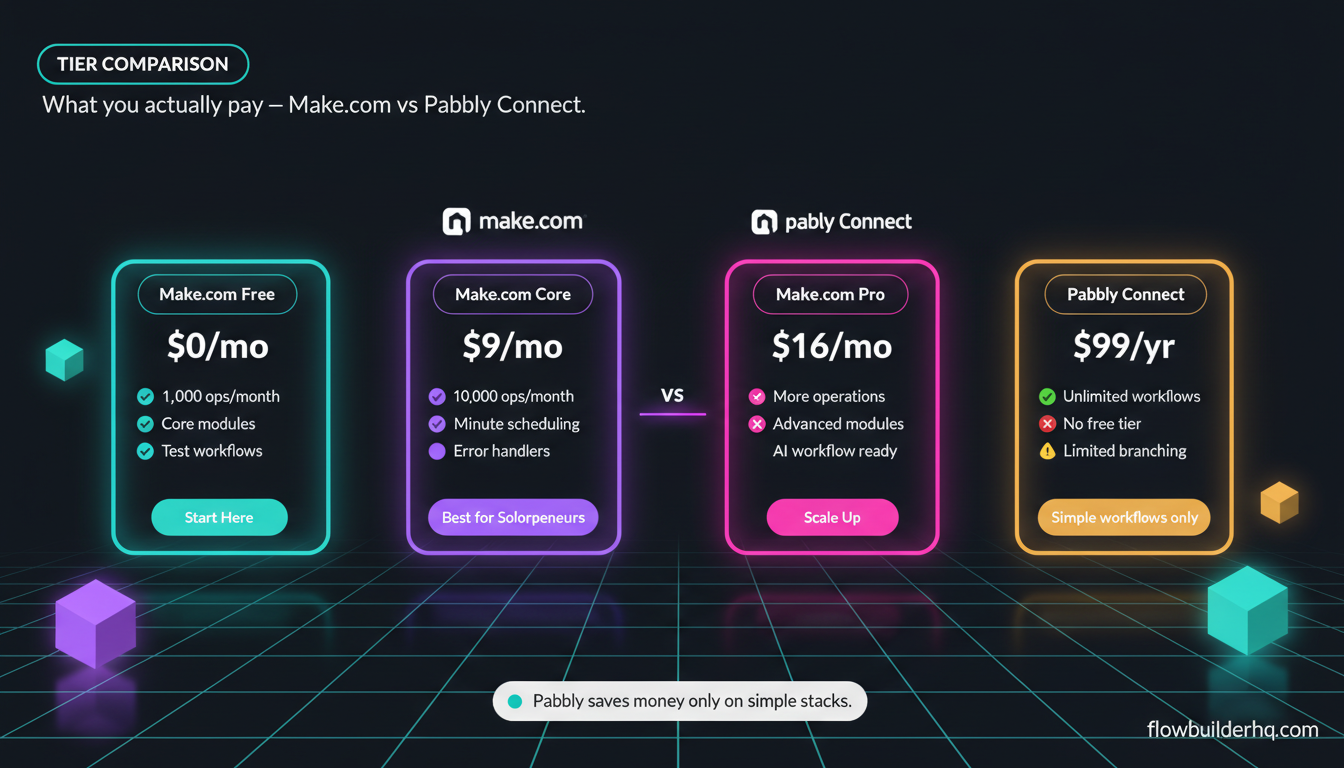
Budget-first buyers who won’t scale complexity. If your business runs on five simple automations that won’t change, the lifetime deal math is real. $99/year against Make.com’s $9/month Core plan ($108/year) isn’t a massive difference, but if lifetime deals are available, it’s cheaper over time for purely simple use cases.
Avoiding recurring SaaS commitments. For solopreneurs who genuinely hate subscriptions on principle, Pabbly’s payment model has psychological value. That’s a real thing, not a trivial consideration.
The Hidden Cost of Weak Error Handling
Here’s where the “cheaper” calculation breaks down. When a multi-step Make.com scenario fails, you know exactly where and why. The execution log shows the precise module, the exact error message, and the data that was in flight. You can fix the issue and resume from the point of failure without reprocessing everything upstream.
When a Pabbly workflow breaks mid-run on a complex chain, your debugging path is murkier. You may not know which step failed, whether any downstream actions fired, or whether you need to manually clean up records in other tools. For a solopreneur handling client onboarding automation or billing workflows, that ambiguity costs real time.
Time spent debugging broken automations is time not spent on client work. That’s the hidden cost the lifetime deal doesn’t advertise.
Pricing Math: What You Actually Pay
Since this isn’t primarily a pricing post, a quick grounded comparison:
Make.com: Free tier (1,000 ops/month). Core $9/mo. Pro $16/mo. Teams $29/mo. For most solopreneurs running moderate automation, Core or Pro covers it. Annual billing reduces costs further.
Pabbly Connect: $99/year standard. Lifetime deals appear periodically at higher one-time prices. No free tier — you’re paying from day one.
If you’re running 3-4 simple workflows, Pabbly’s annual plan is competitive. But if you’re at a point where you need Make.com’s Pro features — more operations, faster scheduling, advanced modules — there’s no equivalent Pabbly tier. You’re either working around limitations or accepting a less reliable stack.
For a more detailed breakdown of what Make.com’s operation counts actually cost at scale, Make.com’s pricing structure is worth reading before committing to either tool.
Real Use Cases: Which Platform Fits
Pabbly Connect is probably fine if:
- Your automations are 2-4 steps, no branching
- You’re not processing arrays or looping through data sets
- You can tolerate manual debugging when something breaks
- You won’t be building AI-enhanced workflows anytime soon
- Budget is genuinely the primary constraint
Make.com is the better fit if:
- You run workflows with conditional logic (different actions based on data values)
- You process lists — line items, rows, contacts, anything plural
- You need reliable error alerts and resume-from-failure capability
- You’re integrating AI tools or webhooks for custom triggers
- You want to automate your entire client workflow, not just one part of it
Solopreneurs doing anything with automated client reporting, lead routing, or multi-tool pipelines will hit Pabbly’s ceiling quickly. Make.com was built for exactly these scenarios.
How They Handle AI-Enhanced Workflows
This is increasingly relevant. If you’re building automations that call an LLM mid-workflow — summarizing content, classifying inbound leads, generating personalized output — the platform’s data handling matters a lot.
Make.com can parse JSON responses from APIs natively, map individual fields to downstream modules, and handle errors from API calls with proper handlers. You can call OpenAI’s API or Anthropic’s Claude API via HTTP modules, map the response, and continue the workflow with the output — all in the same visual canvas.
Pabbly Connect has added AI integrations, but the same data transformation and error-handling limitations apply. If an AI API call returns an unexpected format or rate-limits you, handling that gracefully in Pabbly is harder than it should be.
If AI-enhanced automation is part of your roadmap, Make.com is the safer platform to build on. Pairing it with tools explored in our guide on using Claude for business automation gives you a genuinely capable AI+automation stack.
The Ecosystem Factor
Make.com has a broader template library, a larger community, and more third-party tutorials. When you’re building something new and get stuck, the resources available for Make.com are substantially deeper. Ready-made scenario templates alone can save hours on common workflows.
Pabbly Connect has a community and support documentation, but the ecosystem is thinner. For a solopreneur who learns by adapting existing examples, this gap matters.
Make.com’s official documentation is also considerably more detailed than Pabbly’s, which becomes important when you’re troubleshooting an edge case at 10pm before a client deliverable is due.
What About n8n?
If pricing is the primary concern and you’re comfortable with a steeper setup, n8n is worth knowing about. The self-hosted version is free, and it has robust branching, error handling, and AI integrations that rival Make.com. Cloud Starter is $8/mo. The trade-off is setup complexity — it’s more technical than either Make.com or Pabbly. See our Zapier vs n8n breakdown if you want to explore that option before deciding.

The Honest Verdict
For basic trigger-action workflows on a tight budget, Pabbly Connect does the job. The lifetime deal has real value if you’re disciplined enough to stay in simple-workflow territory.
But solopreneurs who build real operational infrastructure — client pipelines, onboarding sequences, reporting workflows, AI-enhanced automations — will outgrow Pabbly faster than they expect. The missing iterator, shallow error handling, and limited branching aren’t minor inconveniences. They shape what you can build and how long you spend fixing things when they break.
Make.com wins on capability, reliability, and ecosystem. The monthly cost is real but modest — and it pays for itself the first time you catch a broken workflow before it affects a client.
If you’re ready to build on Make.com, start with Make.com’s free plan here — 1,000 ops/month to test your first scenarios at no cost.
Already on Make.com and looking to push further? The Make.com ecommerce automation playbook and the social media posting workflow guide are good next builds. Or if you want to see how Make.com stacks up against another strong contender, the Make.com vs Zapier comparison covers the pricing math and feature gaps in detail.
Building this yourself? Get the workflow pack.
5 ready-to-import n8n workflows — lead capture, invoicing, content repurposing, onboarding, social posting. Free.