Gemini Advanced vs Claude for Solopreneur Writing and Research Tasks
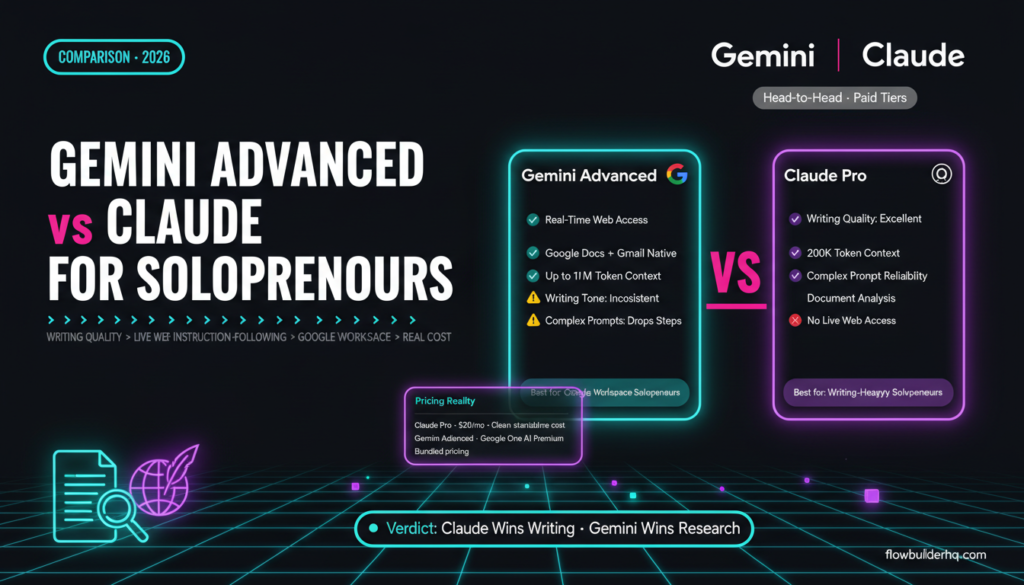
Choosing between Gemini Advanced and Claude as your primary AI assistant comes down to one question: what kind of work do you actually do all day? Both are paid-tier AI tools with real capability. Both will write, research, summarize, and help you think. But they make different trade-offs, and those trade-offs matter more when you’re a solopreneur with no team to absorb the friction.
This comparison focuses on gemini advanced vs claude for solopreneur writing and research tasks — the practical daily work: drafting content, researching competitors, writing client deliverables, summarizing long documents, and building repeatable workflows around AI output. Not benchmarks. Not model architecture. What actually happens when you use these tools to run a one-person business.
What Each Tool Is (and What Tier We’re Comparing)
Gemini Advanced is Google’s paid AI tier, available through the Google One AI Premium plan. It runs on Gemini Ultra (now Gemini 1.5 Ultra / 2.0 series depending on when you’re reading this) and integrates natively with Gmail, Docs, Drive, and Meet. Pricing varies depending on your Google One plan — check current pricing on Google’s site since bundling with storage makes it harder to pin down a standalone figure.
Claude is Anthropic’s flagship AI assistant, available at anthropic.com. Claude Pro runs at $20/month and gives you access to Claude Sonnet and Opus models with higher usage limits. For this comparison, we’re treating both as their paid tiers — what you’d actually use as a solopreneur who takes their AI tooling seriously.
If you want context on how Claude performs specifically as a small business tool, the post on Claude AI for small business covers the practical wins and gaps in more depth.
Writing Quality: Where Claude Pulls Ahead
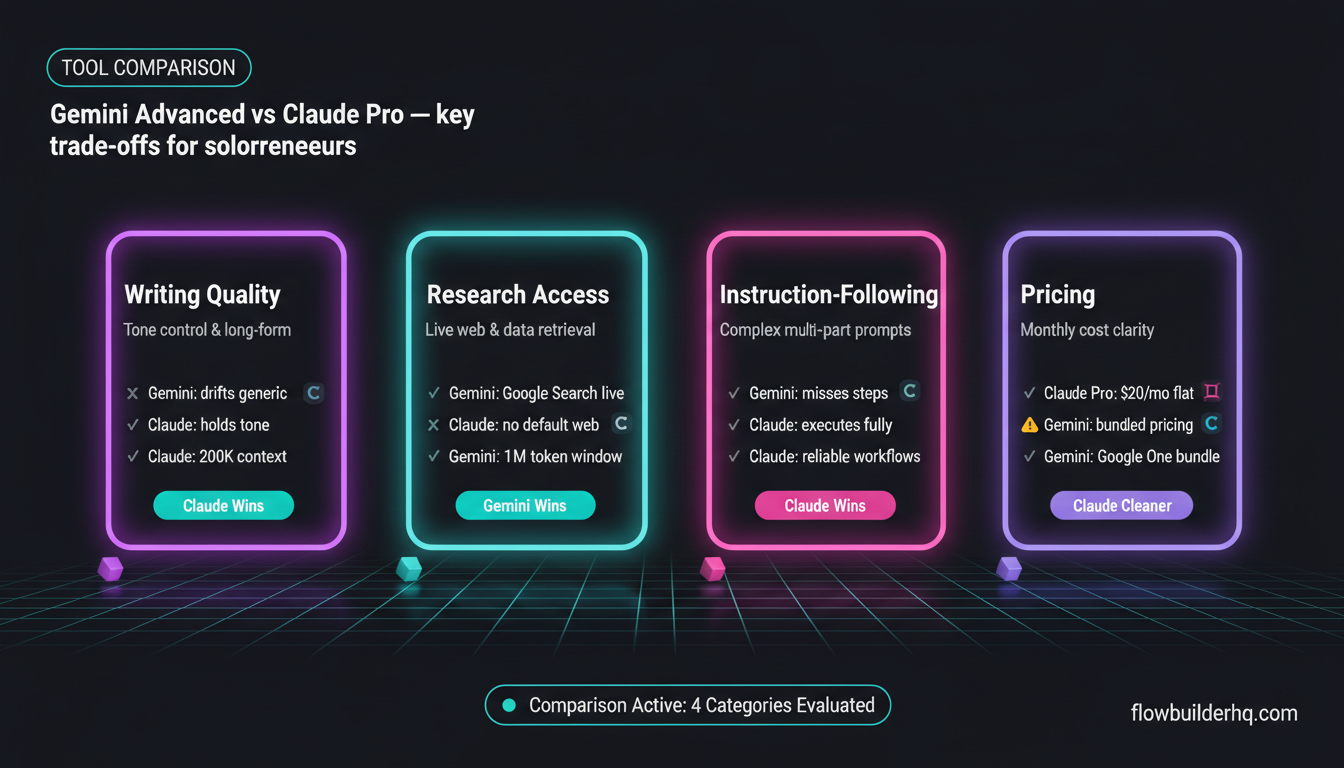
Claude is a better writer. That’s not a controversial take at this point — it’s what most people who use both tools in production will tell you. The output has a more natural register, follows nuance in prompts more accurately, and holds tone consistency across long-form content better than Gemini Advanced does.
Concretely: if you ask Claude to write a client proposal in a direct, non-corporate tone with a specific structure, it respects that. If you ask Gemini Advanced the same thing, you’ll frequently get output that drifts toward generic business language regardless of what you specified. You can correct it, but you’re adding editing rounds that Claude often doesn’t require.
For solopreneurs who produce written deliverables — proposals, reports, emails, blog drafts, LinkedIn content — this gap matters. Claude’s 200K token context window also means you can paste in long briefing documents, style guides, previous drafts, or entire transcripts and ask it to produce content that reflects all of that. Gemini Advanced has a large context window too (up to 1M tokens in some configurations), but the quality of output when using that context for writing tasks tends to be less precise.
The ChatGPT vs Claude comparison for solopreneurs covers Claude’s writing strengths in more detail — much of what applies there applies here when comparing Claude to Gemini Advanced.
Research Tasks: Where Gemini Advanced Has a Real Edge
Gemini Advanced’s strongest card against Claude is real-time web access and Google ecosystem integration. Claude (in the standard Claude.ai interface) does not browse the web by default. Gemini Advanced does — and it draws on Google Search, which means when you’re doing competitor research, checking recent news, or pulling current pricing data, Gemini can give you live results that Claude simply can’t match without a tool integration.
For solopreneur research workflows — writing a market overview, pulling competitor positioning, checking recent developments in a niche before writing a client deliverable — this is a meaningful difference. You’re not cutting and pasting from browser tabs into Claude; Gemini can do the retrieval step itself.
That said, web access alone doesn’t make Gemini a better research tool. The quality of synthesis matters. Gemini tends to surface information accurately but can be shallow in its analysis. It describes what it found; Claude (when you give it the source material manually) tends to draw better inferences, spot contradictions, and give you something closer to an analyst’s view rather than a summarizer’s view.
If your research workflow is “find information and then think hard about it,” you might end up using Gemini to pull the data and Claude to reason about it. That’s a real two-tool workflow some solopreneurs run. Whether that’s worth maintaining two paid subscriptions is a separate calculation.
For a broader look at AI tools built specifically for research, the comparison of Perplexity AI vs ChatGPT for solopreneur research gives useful context — Perplexity is worth considering if real-time research is your primary need.
Google Workspace Integration: A Genuine Advantage for Some Solopreneurs
If your business runs on Google Workspace, Gemini Advanced’s native integration is genuinely useful. You can use Gemini directly inside Google Docs to draft or rewrite content, inside Gmail to draft replies or summarize threads, and inside Drive to ask questions about files without leaving the app.
For the solopreneur who lives in Docs and Gmail, this reduces context-switching. You don’t copy content into a separate chat interface, prompt, copy the output back, and paste it in — you do the work inside the tool you’re already in. That friction reduction is real.
Claude doesn’t have this level of native Google integration. You can use Claude’s API to build similar capabilities into your own workflows — the post on the Claude API for solopreneurs covers what’s buildable without a developer — but out of the box, Claude is a standalone chat interface. You’re doing manual copy-paste to and from your actual work tools.
The counter-argument: Gemini’s in-app suggestions inside Docs can feel intrusive or produce mediocre output when you need nuanced writing. Some solopreneurs turn the integration off and use Gemini as a standalone chat tool anyway, which neutralizes this advantage.
Instruction-Following and Complex Prompts
Claude is consistently better at following complex, multi-part instructions. This matters for solopreneurs who build repeatable prompt workflows — where the same prompt structure gets reused weekly across different inputs.
Example: a prompt that says “take this transcript, identify the three strongest client quotes, write a case study in this specific format, flag any compliance risks, and output each section as a separate heading” — Claude will execute each part accurately. Gemini Advanced tends to miss steps, combine sections that should be separate, or drop the lower-priority instructions when the prompt gets long.
If you’re building AI into your workflow in any systematic way — not just one-off queries but structured prompts that run repeatedly — Claude’s instruction-following reliability makes it the safer choice. That’s especially relevant for solopreneurs automating content tasks, as covered in the post on using Claude AI for business automation.
Coding and Technical Tasks
Both tools handle light coding tasks competently. For solopreneur-level needs — writing a Google Apps Script, fixing a regex, building a simple HTML template — both will get you there. Gemini Advanced has an edge when the task involves Google-specific APIs and services, since it’s trained with awareness of the Google ecosystem and its documentation.
Claude’s code output tends to be better commented and easier to understand for non-developers. It explains what the code does, flags where you’d need to modify it for your specific situation, and is more likely to tell you when a task is outside what it can reliably produce.
For most solopreneurs, this isn’t a deciding factor. Neither tool replaces a developer for complex builds, but both handle the light scripting and template work that solopreneurs actually need.
Pricing Reality
| Tool | Plan | Cost | Notes |
|---|---|---|---|
| Claude | Pro | $20/mo | Sonnet + Opus access, higher limits |
| Gemini Advanced | Google One AI Premium | Pricing varies | Bundled with 2TB Google storage |
The Gemini Advanced pricing situation is worth noting: it comes bundled with Google One storage, so if you’re already paying for Google One, upgrading to the AI Premium tier may add only a few dollars more to what you’re already paying. That changes the cost-benefit calculation. If you’re comparing pure standalone cost, check Google’s current pricing — bundles shift.
Claude Pro at $20/month is a clean, predictable cost. No bundling, no storage upsell. You’re paying for AI capability, not a storage product with AI attached.
For solopreneurs thinking about their full AI spend across tools, the solopreneur tech stack breakdown gives a realistic view of where AI assistant costs fit against your other tools.
Practical Feature Comparison
| Feature | Gemini Advanced | Claude (Pro) |
|---|---|---|
| Real-time web access | Yes (Google Search) | No (by default) |
| Context window | Up to 1M tokens | 200K tokens |
| Google Workspace integration | Native (Docs, Gmail, Drive) | None by default |
| Writing quality / tone control | Good | Excellent |
| Instruction-following (complex prompts) | Inconsistent | Strong |
| API access for automation | Yes (Gemini API) | Yes (Claude API) |
| File / document upload | Yes | Yes |
| Code generation | Good (Google APIs strong) | Good (better explanations) |
| Safety / refusal rate | Moderate | Higher (sometimes over-cautious) |
Where Claude Gets Frustrating
Claude is not without real weaknesses. Its refusal rate is higher than Gemini Advanced — not dramatically, but in practice, you’ll hit more “I can’t help with that” responses on edge-case business tasks. Writing a harsh but honest product critique, drafting a strongly-worded client termination letter, or producing content that addresses sensitive topics can trigger hedging or outright refusals that Gemini handles without issue.
Claude also has no live web access in the standard interface, which creates a genuine workflow gap for research-heavy work. If you need current information, you either feed it documents manually, use the API with web-search tooling, or accept that Claude is reasoning on training data with a knowledge cutoff.
And Claude Pro’s usage limits at the Opus level can be hit faster than you’d expect during heavy work sessions. You’ll drop to Sonnet, which is still excellent — but if you’ve optimized prompts for Opus output, the difference is noticeable.
Where Gemini Advanced Gets Frustrating
The writing quality gap shows up most in longer outputs. Ask Gemini for a 1,500-word piece with a specific voice and you’ll frequently get something that sounds like it was written by a committee. The ideas may be there but the prose is flat, padded, and harder to use without significant editing.
Gemini’s in-app integrations inside Google Workspace, while useful in theory, can be unpredictable. The “Help me write” suggestions inside Docs are sometimes excellent and sometimes embarrassingly generic — you never quite know which you’re going to get. This inconsistency makes it hard to build reliable habits around the feature.
And Gemini is less introspective about its own limitations. Claude will tell you when it’s uncertain, when a task might require verification, or when its training data might be outdated on a specific topic. Gemini Advanced tends to produce confident-sounding output even when the confidence isn’t warranted. For solopreneurs who are using AI output in client-facing work, that matters.
Who Should Pick Each Tool
Pick Gemini Advanced if:
- Your business runs primarily on Google Workspace and you want AI inside your existing apps
- Real-time research capability is a daily requirement and you don’t want to manage a separate research tool
- You’re already paying for Google One and the upgrade cost is marginal
- Your writing tasks are relatively formulaic and don’t require tight tone control
Pick Claude if:
- Writing quality is your primary requirement — proposals, content, client-facing documents
- You work with complex prompts and need reliable instruction-following
- You want to build AI into automation workflows via API — Claude’s API is well-documented and the official Claude documentation gives clear guidance on how to structure requests for consistent output
- You handle long documents — contracts, research reports, transcripts — and need high-quality summarization and analysis
- You care about the AI pushing back appropriately rather than just agreeing with everything
The Two-Tool Case
Some solopreneurs run both. Use Gemini for live research pulls during the day — checking competitor moves, pulling recent news, getting a quick answer grounded in current data — and use Claude for all the writing, drafting, and structured work that needs to be high quality. The cost of both tools combined is still under $40-50/month depending on your Google One tier, which is a reasonable spend for a solopreneur whose primary work involves writing and research.
If you’re looking at a broader stack view, the post on AI tools that actually save solopreneurs time gives a realistic look at which tools pull their weight at the daily operations level.
Whether you need two AI assistants or one depends on how you work. If you’re research-light and writing-heavy, Claude alone covers you. If your day involves heavy research before writing, you’ll feel Gemini Advanced’s web access advantage and may want it in the mix.

The Verdict
For most solopreneurs, Claude is the better primary AI writing and research assistant. The writing quality advantage is real, the instruction-following is more reliable, and the long-context handling for documents and briefs is excellent. Those are the capabilities that matter most when you’re producing work solo without an editor or team to catch problems.
Gemini Advanced earns its place as a research tool for solopreneurs already embedded in Google Workspace — particularly if you need live web access and the upgrade cost is low due to existing Google One spend. It’s not a weak product. It’s a different trade-off profile.
The full roundup of AI writing tools for solopreneurs puts both in context against the wider field — worth reading if you’re still deciding where these tools fit in your stack.
Neither tool requires a long-term commitment. Both offer monthly subscriptions. Run both for a month on your actual work, not toy prompts — and the answer will be obvious within two weeks.
For a direct look at how Claude compares to OpenAI’s models at the API level — relevant if you’re thinking about building rather than just chatting — the Claude API vs OpenAI API comparison covers the technical side honestly.
Building this yourself? Get the workflow pack.
5 ready-to-import n8n workflows — lead capture, invoicing, content repurposing, onboarding, social posting. Free.