Copy.ai Review 2026: The Honest Take for Solopreneurs
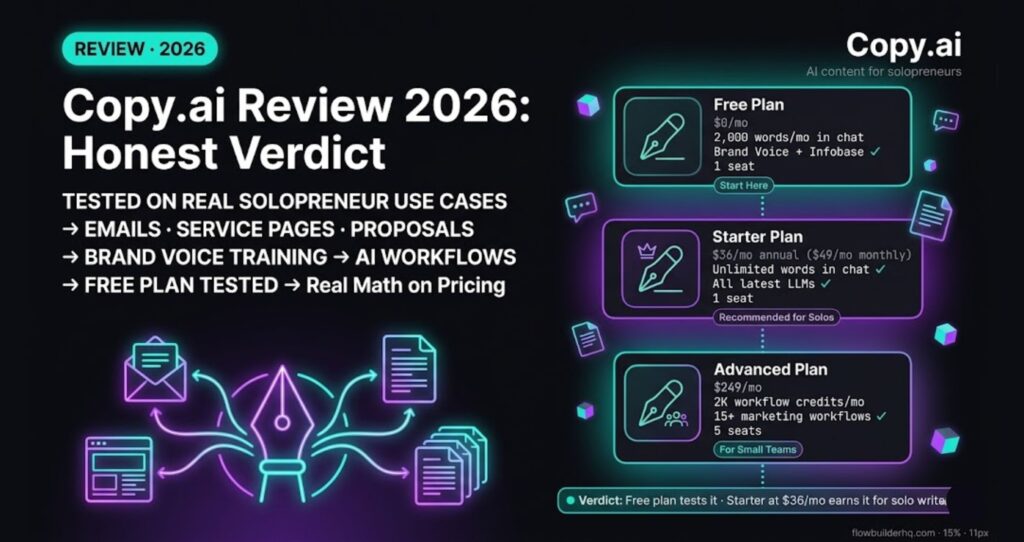
This Copy.ai review 2026 cuts through the generic blog-post takes to focus on what actually matters: how Copy.ai performs on the content solopreneurs actually write — client emails, service pages, proposals, and sequences. The free plan is genuinely useful. The paid tier makes sense if you’re producing real volume. And the gap between “AI scaffolding” and “publishable copy” is bigger than the marketing suggests.
Bottom line: Copy.ai is a serious first-draft engine for business content if you bring strong inputs. It’s not a replacement for knowing your offer, your audience, or your pricing logic. For solopreneurs who write client-facing content regularly, it earns its place. Try Copy.ai free here.
What Most Copy.ai Reviews Get Wrong
Nearly every Copy.ai review online tests it on the same things: blog intros, product descriptions, social captions. That’s fine if you’re a content marketer at an e-commerce brand. It’s not how solopreneurs actually use writing tools.
Your real bottlenecks look like this:
- Cold outreach that sounds like a human wrote it
- Service page copy that actually converts
- Proposals that close deals without sounding like a template
- Follow-up sequences that don’t get unsubscribes
The question isn’t whether Copy.ai can write a 500-word blog intro. It can. The question is whether it can move the needle on the content that actually drives revenue for a one-person business. That’s what this review focuses on.
What Copy.ai Actually Is in 2026
Copy.ai started as a template-based AI writing tool. In 2025-2026, it repositioned itself as a “GTM AI platform” — meaning the core product now revolves around workflows rather than one-off generations. Workflows are structured pipelines that string multiple AI writing steps together with shared context.
For solopreneurs, that shift cuts both ways. The workflow system is genuinely powerful for multi-section documents like proposals. But the UI now reflects a tool built for sales and marketing teams, which means some features feel oversized for a one-person operation.
The classic template library is still there. So is the chat interface (Copy.ai’s ChatGPT-style writing assistant). For most solopreneur use cases, you’ll spend more time in chat and the template library than in the workflow builder.
Copy.ai Pricing in 2026
| Plan | Price | Key Limits |
|---|---|---|
| Free | $0/mo | 1 seat, 2,000 words/mo in chat, Brand Voice + Infobase included |
| Starter | $49/mo (or $36/mo billed annually — 25% off) | 1 seat, unlimited words in chat, unlimited chat projects, access to all latest LLMs |
| Advanced | $249/mo | Up to 5 seats, 2,000 workflow credits/mo, 15+ marketing workflows, 15+ sales workflows, workflow builder access |
| Enterprise | Custom | API access, SSO, custom workflows, dedicated support |
The relevant tier for most solopreneurs is Starter at $36/month billed annually. The free plan is worth a real test before committing — it includes Brand Voice and Infobase, which most free AI writing tools strip out.
The jump from Starter ($49) to Advanced ($249) is steep. There’s nothing in between. Solo operators who stay solo won’t hit this wall. Anyone building a small team will feel it fast.
How Copy.ai Performs on Real Solopreneur Use Cases
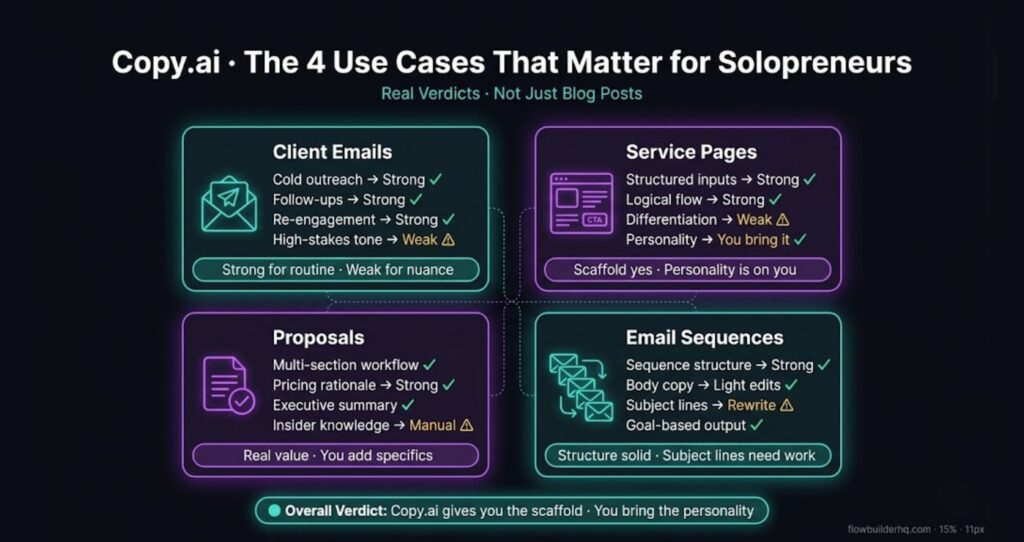
Here’s where Copy.ai actually sits across the use cases solopreneurs run constantly.
Client Emails
This is where Copy.ai’s template library earns its reputation. Cold outreach, re-engagement, follow-ups — these templates produce usable first drafts when you feed in real specifics. Give it industry, service offered, and a concrete problem you solve, and it generates email copy that doesn’t sound generated.
Where Copy.ai struggles: short, high-stakes emails where tone matters enormously. Price increase notices, project delay messages, difficult client conversations — these need nuance that AI consistently underdelivers on without significant prompting and human editing. The shorter and more emotionally weighted the email, the more you have to bring yourself.
Verdict: Strong for routine client emails. Weak for high-stakes conversations.
Service Pages
Copy.ai’s structured inputs work well here. The fields walk you through the right thinking: who you serve, what transformation you deliver, what objections to address, what proof to include. The output follows a logical flow: problem, solution, credibility, CTA.
The honest tension: AI copy optimizes for coherence, not differentiation. The first draft of any service page will read like every other consultant’s website. You get a logical, professional, generic scaffold. The personality, the specific angle, the language that makes someone choose you over the next consultant — you have to inject that manually.
That said, having the scaffold in minutes instead of staring at a blank page for hours is a real time save.
Verdict: Excellent for the structural draft. You still bring the differentiation.
Proposals
This is where Copy.ai’s workflow feature becomes genuinely useful. Proposal workflows let you build a multi-section document — executive summary, scope of work, pricing rationale, next steps — each section feeding context into the next.
The output is coherent and professional. The pricing rationale sections tend to be particularly strong because the underlying prompts frame value before stating cost, which is what good proposals do.
The limitation: Copy.ai doesn’t know your pricing logic, your delivery process, or your relationship with the specific client. Anything requiring insider knowledge needs to be added manually. Think of it as a first-draft engine, not a finished proposal writer.
Verdict: The workflow feature is real value for proposal-heavy businesses. You’re still doing the strategic thinking.
Email Sequences
Copy.ai has a dedicated workflow for email sequences. You specify the goal (nurture, onboarding, sales), the number of emails, and the audience. It outputs a full sequence with subject lines.
Sequence structure is generally solid: welcome, quick win, social proof, deeper education, soft CTA. Subject lines tend to be functional but not compelling — that’s the area you’ll rewrite most. Body copy usually needs light editing to match your specific brand voice and avoid the “this sounds like an AI wrote it” tells.
For a solo operator who’d otherwise spend a weekend writing onboarding emails from scratch, a few hours of editing a sequence beats the alternative.
Verdict: Strong for sequence structure. Rewrite subject lines.
What Copy.ai Does Well
- Speed on first drafts. For business content with clear parameters, it’s faster than any tool in this category.
- Workflow chaining. Multi-step documents stay coherent when you use the workflow structure properly. The context-passing between steps is where Copy.ai pulls ahead of generic AI chat tools for long-form work.
- Template depth. The library covers nearly every business writing scenario — not just marketing copy, but legal-adjacent templates, HR copy, ops content.
- Brand Voice training. On paid plans, you can train Copy.ai on your existing content. Once calibrated, outputs sound noticeably more like you write — meaningfully less robotic than untrained generation.
- Tone controls. More granular than most AI writers. Pushing toward formal, conversational, or anywhere between produces output that actually reflects the setting.
Honest Cons of Copy.ai
Con 1: Generic Output Without Aggressive Inputs
If your inputs are vague, the output is vague. Copy.ai rewards specificity. Feed it “I help businesses grow” and you get copy that could belong to anyone. This isn’t unique to Copy.ai — it’s true of every AI writer — but it’s worth naming because plenty of solopreneurs expect AI to do the thinking. It doesn’t. It executes thinking you’ve already done.
Con 2: Long-Form Documents Drift
Anything substantially over the typical short-form length starts to repeat itself or lose the thread. For proposals longer than two pages or long-form blog content, you need to break the work into sections and prompt each one separately. The workflow feature helps with this, but it’s not automatic — you’re still managing the process.
Con 3: Pricing Jumps Sharply
Free to Starter is $36-49/month — reasonable. Starter to Advanced is $249/month. There’s nothing in between. If you outgrow Starter (need multiple seats, API access, or workflow credits at scale), the cost jumps fast. Solopreneurs who stay solo won’t hit this. Anyone building a small team will.
Con 4: The GTM Pivot Adds Friction for Solo Users
Copy.ai has repositioned as a “GTM AI platform” aimed at sales and marketing teams. Parts of the UI now reflect that — features built for revenue teams, terminology aimed at marketing leaders. The template library and chat interface remain accessible, but finding the right tool for a specific solopreneur use case takes more navigation than it should.
Who Copy.ai Is For
- Solopreneurs writing client-facing content regularly — emails, proposals, service pages, sequences
- Freelancers who need first drafts fast and have the editorial judgment to improve them
- Small service businesses producing onboarding or sales content at any volume
- Anyone who tried free AI tools and found them too shallow for serious business use
Who Copy.ai Is Not For
- Solopreneurs who only need occasional copy — the free plan covers you, but paying for Starter at low volume doesn’t make sense
- Technical documentation or highly specialized writing (legal, medical, financial) — heavy editing required in these areas
- Anyone expecting AI to replace their understanding of their own offer and audience
How Copy.ai Fits Into a Broader Automation Stack
Copy.ai works best when it’s part of a workflow, not an isolated tool. You can connect it to your CRM, your project management system, or trigger content generation as part of a larger automation. Tools like Make.com make this kind of cross-platform automation possible without writing code.
For a concrete example of Copy.ai inside an automation pipeline, see How to Automate Content Repurposing with Make.com — that tutorial uses Copy.ai’s Workflows API as the content engine for turning one blog post into LinkedIn, email, and tweet outputs automatically.
If you’re building out the broader stack around AI writing tools, the best automation tools for solopreneurs in 2026 covers how the pieces fit together.
Final Verdict: Is Copy.ai Worth It in 2026?
Copy.ai in 2026 is a serious tool for solopreneurs who write business content at any meaningful volume. It’s not magic — it produces better raw material faster, not finished work. The Brand Voice training, the workflow chaining, and the template depth make it genuinely more useful than most AI writers for real business use cases.
The free plan is worth starting with — it includes Brand Voice and Infobase, which is more than most free AI tools offer. If you hit its 2,000-word monthly limit consistently, that’s the signal to upgrade. The Starter plan at $36/month annually pays for itself the first time it saves you serious time on a proposal or sequence.
The honest truth: Copy.ai gives you the scaffold. You bring the personality. That trade is worth making for solopreneurs producing client-facing content regularly. It’s not worth making for occasional users — the free plan covers you.
Start with the free plan and test it on one real piece of content you’re already working on. That’s the only review that matters for your business. Get started with Copy.ai here.
Building this yourself? Get the workflow pack.
5 ready-to-import n8n workflows — lead capture, invoicing, content repurposing, onboarding, social posting. Free.